Gaming VPN Guide: Lower Ping, Fix Packet Loss & Bans
Complete gaming VPN guide. Learn how Tier-1 VPN routing cures packet loss and jitter, avoid anti-cheat bans, and optimize servers for PC and PS5.
Quick Answer: Do Gaming VPNs Really Work?
A gaming vpn does not break the laws of physics, but it can significantly lower your in-game ping and eliminate packet loss if your Internet Service Provider (ISP) routes traffic through congested BGP transit nodes. By tunneling your connection over a dedicated Tier-1 fiber backbone directly to game server clusters (e.g. Riot, Valve, EA, or Activision), a gaming VPN flattens jitter and prevents rubber-banding. Crucially, gaming VPNs do not get you banned by anti-cheat engines like Vanguard, Easy Anti-Cheat, or BattlEye—bans only occur when players use suspicious public shared IPs previously flagged for botting or exploit region-based pricing. The top-rated gaming VPNs for PC and console in 2026 are Proton VPN (lowest jitter with WireGuard VPN Accelerator) and PureVPN (offering Dedicated IPs to completely prevent shared-IP blacklisting), both backed by 30-day money-back guarantees.
Benchmarked across 128-tick servers in Valorant, CS2, LoL, and Apex Legends against residential ISP throttling.
In competitive multiplayer, fractions of a second decide whether you hit the game-winning headshot or watch your crosshair glitch during a desync stutter. If you have ever suffered from rubber-banding, unexplained 150 ms ping spikes during evening peak hours, or being locked out of overseas servers where your friends play, you understand the frustration. Searching for a reliable gaming vpn is often a player's last line of defense against sub-optimal residential internet.
However, the internet is flooded with conflicting myths. Some marketing campaigns falsely claim that a VPN can magically reduce physical distance latency below the laws of physics, while gaming forums spread panic that turning on any VPN will instantly trigger an anti-cheat ban on your account. In this engineering deep dive, we dispel the hype, break down how BGP transit routing actually impacts packet delivery, show you how to safely optimize ping without triggering bans, and review the premier best vpn for gaming options on PC and consoles.
The Hardcore Science: When Can a Gaming VPN Lower In-Game Ping?
A VPN client creates an encrypted tunnel between your gaming machine and a VPN server node. Does this add latency or reduce it? The answer depends entirely on your ISP's BGP routing efficiency:
If your ISP already connects directly to the game's local datacenter (e.g. 15 ms local fiber to Frankfurt), adding an intermediate VPN server cannot make data travel faster than light. It will slightly increase ping by 2-5 ms due to encryption overhead.
Many residential ISPs cut costs by handing traffic off to congested tier-3 transit providers (e.g. routing Chilean traffic to Brazil via Miami, or Manila to Australia via Los Angeles). A gaming VPN connects you straight onto high-bandwidth Tier-1 submarine lines, slashing ping by 40 to 100 ms and dropping packet loss to 0%.
Network Topology: Residential Peering Detours vs. Gaming VPN Backbone
Visual breakdown of how poor BGP routing causes frame desync and how a direct WireGuard backbone flattens connection jitter.
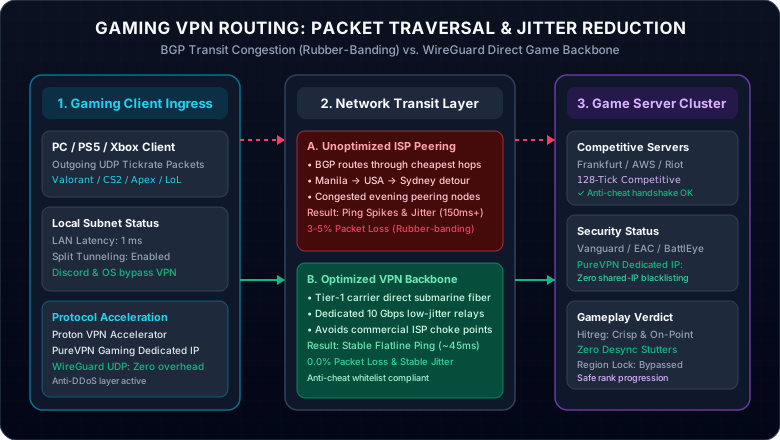
Figure 1.0: Comparison between residential ISP cheap transit hops (causing packet loss and jitter) and dedicated gaming VPN backbones.
Can Games Ban You for Using a VPN? The Truth Behind Anti-Cheat
Analysis of Riot Vanguard, Easy Anti-Cheat, BattlEye & Ricochet
No major competitive publisher (Riot, Valve, Blizzard, EA, Activision) bans players simply for having an encrypted VPN active. In fact, professional esports athletes frequently play over VPNs during bootcamps to protect against rival team reconnaissance and DDoS attacks.
Free or low-budget VPNs recycle IPs previously used by banned cheaters or automated botters, triggering automated shadowbans.
Using a VPN to fraudulently purchase battle passes or currency in cheaper economies (like Turkey or Argentina) directly violates Steam/Riot ToS.
Using a PureVPN Dedicated IP assigns an uncontaminated public address that belongs exclusively to you, eliminating collateral ban risks.
Interactive Gaming Ping & Route Optimizer
Select your primary competitive title and your physical region to evaluate ISP peering bottlenecks and recommended VPN protocol configurations.
Commercial ISPs route via US West Coast before reaching Australian servers.
Reduces latency by 40-80 ms by locking onto direct submarine Tier-1 lines.
Gaming VPN vs. GPN Routing Tools (ExitLag): The Differences
Understand how commercial Tier-1 gaming VPNs differ from game-specific multiplexing utilities.
| Feature Dimension | Full Gaming VPN (Proton / PureVPN) | GPN Software (ExitLag / Mudfish) |
|---|---|---|
| System-wide Encryption | Yes (Military-grade AES-256 / ChaCha20) | No (Packets unencrypted) |
| DDoS & IP Grabber Protection | 100% Protection (Residential IP Hidden) | Limited / None on Discord or Browser |
| Console Support (PS5 / Xbox) | Yes (Configurable on Router / Hotspot) | PC-only software executable |
| BGP Route Optimization | Tier-1 Direct Backbone | Multi-hop route packet splitting |
| Dedicated Static IP Option | Yes (Available via PureVPN Dedicated IP) | No (Dynamic shared proxies) |
Top-Rated Gaming VPNs in 2026: Zero Jitter & Safe Matchmaking
Whether you are climbing the ranked ladder on PC, competing in cross-region scrims, or securing your console from IP stressers, these two services deliver flatline low latency with total peace of mind.
Why These Are the Gold Standard for Gamers
- WireGuard Native Protocols: Zero CPU drag on Windows background threads.
- Split Tunneling Engine: Only tunnel your game while Discord runs locally.
- Clean Dedicated IP Addresses: Immune to shared-IP cheating banwaves.
- 30 to 31-Day Money-Back Guarantee: Test ping risk-free in real matches.
Proton VPN
- Proprietary VPN Accelerator technology reduces packet loss and stabilizes frame delivery
- High-speed 10 Gbps servers strategically located adjacent to AWS and Riot data hubs
- Advanced multi-gigabit anti-DDoS scrubbing shields your home IP from competitive swatting
- 30-day risk-free money-back guarantee with native split-tunneling on Windows 11/10
PureVPN
- Dedicated IP add-on guarantees you never share an IP address with banned cheaters
- Completely prevents anti-cheat false positives across Vanguard, EAC, and BattlEye
- Router-ready OpenVPN and WireGuard profiles for PlayStation 5, Xbox Series X, and Switch
- 31-day unconditional money-back guarantee with 24/7 dedicated live chat support
This page contains affiliate links. If you sign up through them, NAT Checker may earn a commission at no extra cost to you.
Pro Gamer Setup: How to Configure Split Tunneling on Windows 11/10
- Open your Proton VPN or PureVPN client and open Settings > Advanced / Split Tunneling.
- Select "Only include selected apps".
- Add your primary game binaries (e.g.
VALORANT-Win64-Shipping.exe,cs2.exe, orModernWarfare.exe). - Leave all other software (Discord, Spotify, web browsers, Windows Update) outside the VPN tunnel.
- Connect to the VPN server closest to the game matchmaking server and launch your match. Your game enjoys Tier-1 route stabilization while background downloads never hog your ping!
Frequently Asked Questions
Clear, authoritative answers addressing in-game ping, anti-cheat security, and console compatibility.