VPN for Mac: Built-in Settings, Free Apps & M-Chip Guide
Does Mac have a built-in VPN? Compare macOS settings vs iCloud Private Relay, fix sleep disconnects, and find the best free native Apple Silicon VPN apps.
Quick Answer: Does Mac Have a Built-in VPN?
No, macOS does not come with a built-in VPN service. The "VPN" menu in macOS System Settings is solely a native client configuration manager (supporting IKEv2, L2TP, and IPsec) designed for manual enterprise or custom server connections. Furthermore, Apple's iCloud Private Relay is not a full Mac VPN—it protects only Safari web traffic and DNS queries, leaving Chrome, Slack, Discord, terminal commands, and torrents outside its protection. For full system protection optimized for Apple Silicon (M1/M2/M3/M4), Proton VPN offers the best 100% free macOS client with unlimited data, zero ads, and no battery drag, while PureVPN provides the lowest cost solution with 6,500+ servers, dedicated streaming, and a separately paid port-forwarding add-on.
Benchmarked on MacBook Pro (M3/M2/M1) and MacBook Air for sleep-wake persistence, battery consumption, and Rosetta-free execution.
Mac users value elegant software design, unmatched battery efficiency on Apple Silicon, and macOS's ironclad UNIX foundation. Yet when opening System Settings > Network > VPN, you encounter a confusing configuration pane with no servers attached. When you enable iCloud Private Relay, you discover it only protects Safari—leaving your Chrome browser, Slack communications, Discord calls, terminal commands, and BitTorrent transfers outside its protection. Meanwhile, closing your MacBook lid often drops existing VPN tunnels, leading to embarrassing reconnect loops and IP leaks upon wake.
Choosing a vpn for mac requires looking beyond generic Windows-ported software. You need a client built natively for Apple Silicon (ARM64) that integrates into macOS's modern NetworkExtension framework without draining your battery or freezing when waking from sleep.
macOS Built-in Settings vs iCloud Private Relay vs Native WireGuard VPN
Comparing system integration, application coverage, and Apple Silicon cryptographic performance.
| Evaluation Metric | macOS System Settings | iCloud Private Relay | Native macOS VPN (WireGuard) |
|---|---|---|---|
| Service Infrastructure | None (Client utility only) | Apple + Fastly/Cloudflare CDN | Proton VPN / PureVPN Network |
| Applications Protected | Manual protocol targets | Safari & Safari DNS Only | 100% of Mac Apps & Terminal |
| Apple Silicon Optimization | Native BSD sockets | Native Darwin daemon | Hardware-accelerated ARM64 |
| Sleep/Wake Resilience | Frequently drops on lid close | Restarts with Safari | Persistent Session Re-handshake |
| Virtual Country Selection | Requires manual server IP | No (Keeps general country/city) | Yes (65+ to 110+ Countries) |
| P2P / Torrenting Support | No | Blocked | Full P2P & Port Forwarding |
Solving the MacBook Sleep/Wake Disconnect Bug
When you close your MacBook lid, macOS enters a deep sleep state to preserve battery, putting network adapters into standby. Legacy VPN clients (and outdated OpenVPN wrappers like Tunnelblick) drop the session. When you reopen the lid, apps reconnect before the VPN tunnel re-establishes, causing immediate IP and DNS leaks. Modern native clients utilize NetworkExtension system services and an OS-level Kill Switch that blocks unencrypted packets until the WireGuard tunnel re-authenticates.
Apple Silicon (ARM64) vs Legacy Rosetta Overhead
Many outdated VPN clients still run under Apple's Rosetta 2 translation layer. This translation forces the CPU to decode x86-64 instructions into ARM64, resulting in noticeable battery drain on M1, M2, M3, and M4 MacBooks. In contrast, Proton VPN and PureVPN offer native Universal ARM64 binaries that leverage hardware cryptographic instructions, delivering multi-gigabit speeds with virtually imperceptible battery consumption.
macOS System Routing: NEPacketTunnelProvider vs Safari iCloud Private Relay
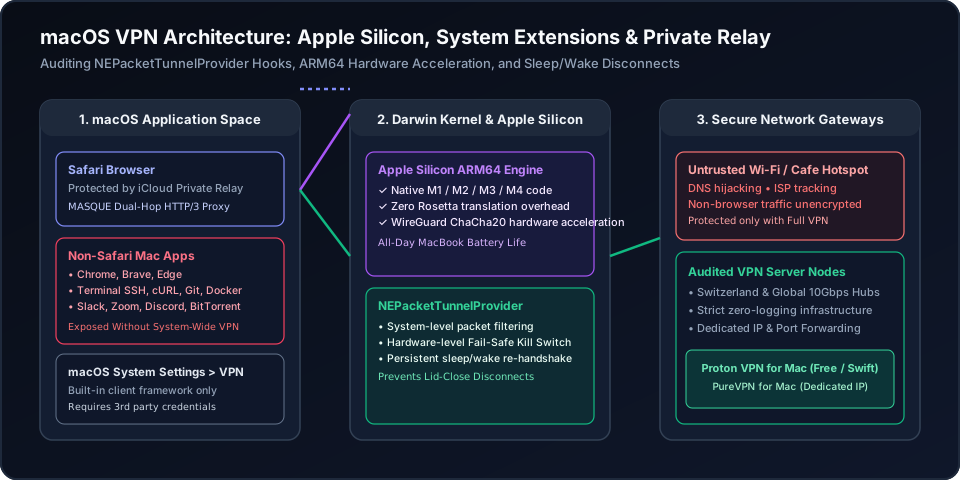
Figure 1: Architectural inspection of macOS network sockets. A full-system VPN binds to Darwin's NEPacketTunnelProvider to encrypt all user applications (Chrome, Slack, Docker, Terminal), whereas iCloud Private Relay only intercepts Safari HTTP/3 datagrams.
macOS VPN Protocol & Compatibility Selector
Select your Mac hardware and usage pattern to evaluate Apple Silicon optimization, sleep-wake handling, and recommended configurations.
MacBook Air / Pro All-Day Battery Preservation
Native ARM64 WireGuard Client (Proton VPN Free)
Native M1/M2/M3/M4 binary (Zero Rosetta translation overhead)
Suspends packet keepalives cleanly without waking CPU cores
OS-level NetworkExtension packet filter (<1% battery impact)
The Best Verified Mac VPN Apps (Free vs Budget Premium)
Skip clunky manual OpenVPN setups. These two providers provide native Apple Silicon applications with verified zero-logging.
Proton VPN
- 100M+ Proton accounts across its privacy ecosystem
- Five consecutive annual independent no-logs audits
- Open-source VPN apps with public code
- 30-day refund window for eligible paid-plan purchases
2-year plan
PureVPN
- 3M+ users and operating since 2007
- Fourth consecutive independent no-log assessment
- ISO 27001-certified information security program
- 31-day refund window for eligible initial purchases
5-year plan·$1.69/mo $12.95/mo
This page contains affiliate links. If you sign up through them, NAT Checker may earn a commission at no extra cost to you.
Proton VPN for macOS
Engineered natively in Swift for macOS, Proton VPN offers an audited 100% free unlimited data tier with no speed caps and zero advertising trackers.
- 100% Unlimited Free Bandwidth: Browse, code, and download without monthly data limits.
- Native Apple Silicon (ARM64) Binary: Near-zero CPU overhead preserves MacBook battery all day.
- Open-Source & Audited: Publicly verifiable code on GitHub under strict Swiss data protection laws.
PureVPN for macOS
For Mac users requiring 6,500+ servers across 65+ countries, permanent Dedicated IPs, and port forwarding add-on for NAS or homelab remote access, PureVPN provides unmatched value starting under $2/month.
- Dedicated IP Add-on: Bypasses annoying Cloudflare verification loops and protects remote homelabs.
- Native macOS Kill Switch: Instantly cuts traffic if the Wi-Fi or VPN renegotiates during sleep wake.
- KPMG Always-On Audited No-Logs: Transparent external audits guarantee your Mac browsing stays private.
How to Setup and Optimize a VPN on macOS
Step-by-step guide to installing a native Apple Silicon Mac VPN, authorizing system network extensions, enabling kill switch protection, and verifying leak-free encryption.
- 11. Download Native Apple Silicon (.dmg) Client
Download the verified macOS installer from Proton VPN or PureVPN. Ensure you select the Universal / Apple Silicon build for maximum energy efficiency on M-series MacBooks.
- 22. Authorize macOS System Network Extension
Open the application and drag it to your Applications folder. When prompted by macOS System Settings ("System Extension Blocked" or "App would like to add VPN configurations"), click Allow and authenticate with Touch ID.
- 33. Select WireGuard Protocol & Enable System Kill Switch
In the VPN client preferences, select WireGuard as your primary protocol and enable the permanent Kill Switch to drop unencrypted packets if the tunnel ever renegotiates.
- 44. Configure Sleep/Wake Auto-Reconnect Settings
Enable "Auto-connect on launch" and "Reconnect on wake" in the client settings to ensure that opening your MacBook lid immediately re-establishes the encrypted tunnel without manual intervention.
- 55. Audit Public IPv4, IPv6 & DNS Protection
Connect to your desired server, open your browser or run "curl ifconfig.me" in Terminal, and verify that your residential ISP address and local DNS servers are completely cloaked.
Frequently Asked Questions
Clear, authoritative answers addressing Mac VPNs, Apple Silicon performance, and sleep disconnect fixes.