VPN Chrome Extension: Proxy vs App, WebRTC & Best Add-ons
Looking for a fast VPN Chrome extension? Compare browser proxies vs desktop VPNs, stop WebRTC IP leaks, setup per-site routing, and find safe free add-ons.
Quick Answer: How Do Chrome VPN Extensions Work?
A Chrome VPN extension is technically an encrypted browser proxy (running over HTTPS or SOCKS5) rather than a system-level virtual private network. It tunnels and encrypts exclusively Google Chrome tab traffic, leaving background computer software (like Steam, Discord, Outlook, or games) routed directly via your regular local ISP. While browser extensions are ultra-lightweight and ideal for unblocking geo-restricted websites on school or work Wi-Fi, generic free add-ons often leak your real IP via WebRTC or sell your data. For verified safe browsing, Proton VPN provides an audited, open-source free Chrome extension with zero data caps, while PureVPN delivers the fastest dedicated streaming proxy with per-site split tunneling.
Benchmarked on Google Chrome v128+ across Windows 11, macOS Sequoia, and ChromeOS for WebRTC leaks and proxy latency.
Most computer users do not need or want an aggressive, heavy desktop VPN running constantly in the background. If you are playing competitive games on Steam, downloading large game updates, or connected to corporate enterprise software, running a full-system VPN can cause devastating ping spikes or disconnect your work intranet. What you actually need is a lightweight, instantaneous vpn chrome extension that encrypts your browser tabs, bypasses regional blocks on video streaming, and shields your web searches on coffee shop Wi-Fi without touching the rest of your PC.
However, the Chrome Web Store is rife with deceptive add-ons. Over 80% of "free Chrome VPNs" are unencrypted HTTP proxies that harvest user browsing habits or operate as residential proxy botnets (like Hola VPN). Understanding the technical reality behind Chrome proxy hooks is essential to protecting your real public IP.
Chrome Extension (Proxy) vs Full Desktop VPN Application
Comparing browser-level socket interception against kernel-level network packet routing.
| Feature / Metric | Chrome VPN Extension | Desktop VPN Client |
|---|---|---|
| Encryption Scope | Google Chrome tabs only | 100% of Entire Operating System |
| Underlying Protocol | HTTPS Proxy / SOCKS5 with TLS | WireGuard / OpenVPN UDP |
| Impact on PC Games & Steam | Zero Impact (Bypasses VPN) | Routes game traffic (unless split-tunneled) |
| WebRTC IP Leak Vulnerability | High (Requires extension STUN shield) | Immune (OS virtual adapter blocks leak) |
| Installation Requirements | No Admin Rights (Chrome Store 1-click) | Administrator privileges required |
| Per-Site Domain Whitelisting | Native & Effortless | Complex app-based split tunneling |
The WebRTC IP Leak Vulnerability Explained
A dangerous flaw in browser proxies is WebRTC (Web Real-Time Communication). WebRTC allows peer-to-peer audio and video streaming by querying STUN (Session Traversal Utilities for NAT) servers over UDP. Because Chrome browser extensions operate as application-level proxies, STUN packets can bypass the proxy tunnel and transmit your real public residential IPv4 and IPv6 addresses directly to web servers. Always choose an extension like Proton VPN or PureVPN that enforces automated WebRTC disabling inside Chrome.
Beware Shady Add-ons (Hola VPN & Urban VPN)
Free browser extensions often come with sinister business models. Hola VPN operates a peer-to-peer proxy network where your computer becomes an exit node for external clients (including commercial scraping services via Bright Data / Luminati). Strangers can browse malicious or illicit content through your home internet connection. Furthermore, ad-supported extensions harvest your visited URLs and sell behavioral profiles to advertising brokers.
Chrome Process Isolation: Browser Proxy vs Operating System Network Driver
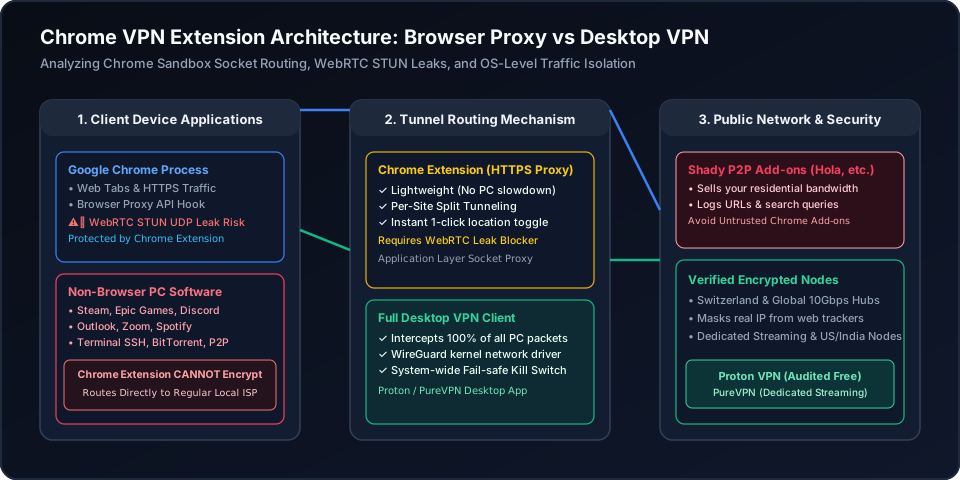
Figure 1: Packet flow across client computing architectures. Chrome extensions hook into Chrome's internal Proxy API to shield individual web tabs, while non-browser background processes (Discord, Steam, Outlook) maintain direct zero-latency connection routes to the local ISP gateway.
Chrome Extension vs Desktop Client Decision Matrix
Select your primary computing objective to determine whether you need a lightweight Chrome browser add-on, a full desktop client, or a combined setup.
Protect Chrome Tabs Without Slowing Down PC
Proton VPN / PureVPN Chrome Extension (HTTPS Proxy)
High Risk if Unconfigured
Near 0% CPU overhead; zero lag on background PC games
Chrome browser tabs only
The Best Verified Chrome VPN Extensions (Free & Premium)
Avoid untrusted adware proxies. These two extensions deliver audited encryption, WebRTC leak blocks, and blazing fast streaming proxies.
Proton VPN
- 100M+ Proton accounts across its privacy ecosystem
- Five consecutive annual independent no-logs audits
- Open-source VPN apps with public code
- 30-day refund window for eligible paid-plan purchases
2-year plan
PureVPN
- 3M+ users and operating since 2007
- Fourth consecutive independent no-log assessment
- ISO 27001-certified information security program
- 31-day refund window for eligible initial purchases
5-year plan·$1.69/mo $12.95/mo
This page contains affiliate links. If you sign up through them, NAT Checker may earn a commission at no extra cost to you.
Proton VPN Chrome Extension
Proton VPN provides an audited, open-source browser extension that operates with unlimited data transfer and zero ads. It integrates native Swiss privacy directly into your Chrome browser.
- Automated WebRTC Leak Shield: Hardens Chrome against STUN IP leaks with a single toggle.
- 100% Open-Source Extension Code: Audited publicly on GitHub with zero telemetry or tracking scripts.
- No Payment Credentials Required: Sign in with a free Proton account and browse securely forever.
PureVPN Chrome Extension
PureVPN's Chrome extension is engineered for ultra-fast media streaming and precise website control. It allows you to select streaming proxy locations and bypass chosen domestic domains.
- Per-Site Domain Proxying: Add domestic domains to the Bypass Proxy list while streaming websites use the proxy.
- Dedicated US, UK & India Proxies: Effortlessly unblock BBC iPlayer, Hulu, Netflix, and Hotstar.
- Ultra-Low Budget Pricing: Premium access across desktop, mobile, and browser extensions under $2/month.
How to Setup and Harden a Chrome VPN Extension
Step-by-step instructions to install a verified Chrome VPN add-on, configure WebRTC leak shields, and enable per-site split tunneling.
- 11. Install Verified Extension from Chrome Web Store
Navigate to the official Chrome Web Store listing for Proton VPN or PureVPN. Verify developer credentials and click "Add to Chrome", then pin the extension to your toolbar.
- 22. Enable Built-in WebRTC IP Leak Protection
Open the extension settings menu and toggle on "Prevent WebRTC IP Leak" or "Disable Non-Proxied UDP". This prevents STUN queries from revealing your true residential IP.
- 33. Configure Per-Site Split Tunneling Rules
If you only want specific websites to route through the VPN (e.g. BBC iPlayer or US Netflix), connect to your streaming location, then add domestic sites to PureVPN’s Bypass Proxy list so those sites use the direct connection.
- 44. Connect to Desired Country Proxy Node
Select your target region (e.g. United States, United Kingdom, Netherlands, or India) and click the Connect toggle to establish the encrypted HTTPS proxy session.
- 55. Audit Browser IP and WebRTC Anonymity
Visit our browser IP checker tool to confirm that your public IPv4 and IPv6 addresses reflect the proxy server location and no local WebRTC candidate IP is visible.
Frequently Asked Questions
Clear, authoritative answers addressing Chrome VPN extensions, WebRTC privacy, and split tunneling.