iPhone VPN: Settings, Private Relay vs VPN & Best Apps
Complete iPhone VPN guide. Demystify iOS VPN settings, understand iCloud Private Relay vs VPNs, stop auto-reconnecting profiles, and find the best free apps.
Quick Answer: Does iPhone Have a Built-in VPN?
No, Apple iPhones do not come with a built-in VPN service. The "VPN & Device Management" menu in iOS Settings is only an operating system client framework (supporting IKEv2, IPsec, and NetworkExtension APIs) that requires external server credentials or an app to function. Apple's iCloud Private Relay is not a full VPN either—it only encrypts Safari web browsing and DNS lookups via a dual-hop MASQUE proxy, leaving Chrome, TikTok, banking apps, and game traffic exposed on unencrypted public Wi-Fi. For full-device protection on iOS without draining battery, the top-rated free solution is Proton VPN (unlimited bandwidth, zero logs, open-source iOS code), while PureVPN provides the most affordable premium option with 6,500+ high-speed servers.
Benchmarked on iPhone 16 Pro, 15, and SE across public Wi-Fi, cellular handoffs, and iCloud Private Relay.
You invested in an iPhone for its industry-leading privacy, strict sandbox permissions, and seamless ecosystem. Yet inside iOS Settings, you inevitably encounter a cryptic "VPN & Device Management" toggle. Meanwhile, Apple heavily markets iCloud Private Relay, leaving millions of iPhone owners wondering: Does iPhone already have a built-in VPN? Is my cellular data leaking on Starbucks Wi-Fi? Why does my VPN keep turning on by itself, and will running an iPhone VPN drain my battery?
While Apple’s ecosystem is remarkably secure against malware, its network transmission layer remains subject to the same internet protocol realities as any other device. Let’s break down the technical differences between Apple’s built-in networking hooks, iCloud Private Relay, and genuine whole-device VPN encryption.
iOS Built-in Settings vs iCloud Private Relay vs Full VPN
Understanding the exact network boundaries between Apple's native proxy and encrypted VPN tunnels.
| Feature / Metric | iOS Built-in Settings | iCloud Private Relay | System VPN (WireGuard) |
|---|---|---|---|
| Service Provider | None (Requires 3rd party host) | Apple + Cloudflare/Fastly | Proton VPN / PureVPN |
| Apps Protected | None until configured | Safari & Safari DNS Only | 100% of All iPhone Apps |
| Virtual Location Switching | Manual server IP entry | No (Maintains local region) | Yes (65+ to 110+ Countries) |
| Streaming Geo-Unblock | No | No (CDN flagged) | Yes (Netflix, BBC, ESPN) |
| Public Wi-Fi Sniffing Shield | Dependent on protocol | Partial (Non-Safari unencrypted) | Complete (System AES/ChaCha) |
| Battery Overhead | Variable | < 0.5% (OS Level) | < 1.5% with WireGuard |
VPN Replaces iCloud Private Relay in iOS
A common question raised by iOS 18 users on Reddit is whether running a VPN breaks iCloud Private Relay. In the Apple Darwin networking stack, an active NEPacketTunnelProvider takes absolute precedence. When you connect an iPhone VPN, iOS automatically routes Safari queries through the VPN tunnel and pauses Private Relay. As soon as you toggle off the VPN, Private Relay seamlessly re-engages without any user intervention.
Why Does iPhone VPN Keep Turning On?
If your iPhone VPN continuously reconnects seconds after you switch it off, you are encountering the iOS "Connect On Demand" daemon. Certain VPN profiles or corporate MDMs instruct iOS to trigger an immediate encrypted reconnect whenever Wi-Fi or cellular networks hand off. To fix this: navigate to Settings > General > VPN & Device Management > VPN, tap the blue (i) info button next to the profile, and switch off Connect On Demand.
iOS Data Path: Safari MASQUE Proxy vs System-Wide VPN Packet Routing
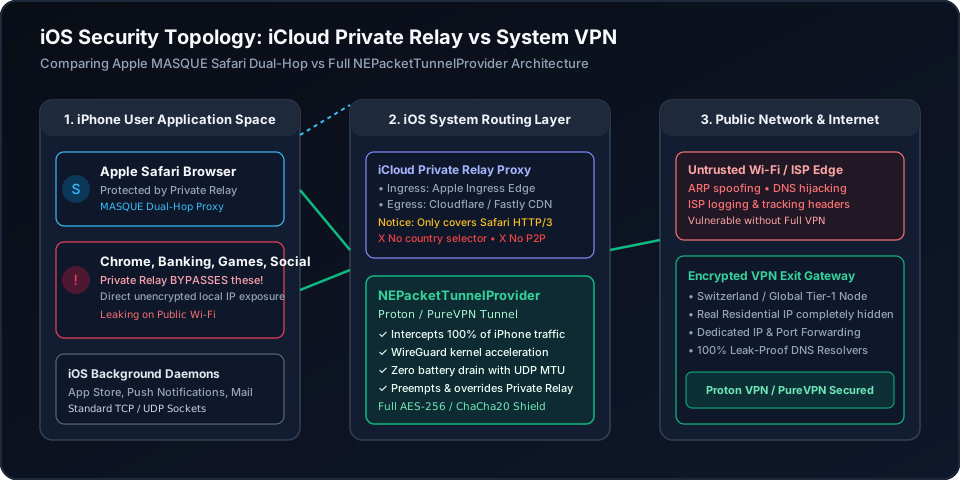
Figure 1: Architectural comparison between Apple Safari dual-hop MASQUE relay (which only protects Safari browser packets) and a full-system iOS VPN tunnel using WireGuard to shield all third-party background applications from local network inspection.
iOS VPN Profile & Privacy Diagnostic Matrix
Select your primary iPhone usage pattern to determine the optimal encryption protocol, battery impact, and Apple system configuration.
Public Wi-Fi Security (Cafes, Hotels, Airports)
Full System WireGuard Tunnel Required
Minimal (<1.5% daily drain)
VPN automatically takes precedence over Private Relay
Enable "Connect On Demand" on untrusted Wi-Fi SSIDs in iOS Settings.
The Best Verified iPhone VPN Apps (Free & Budget)
Beware of deceptive App Store "free trials" that sneakily charge $9.99 weekly. These two providers provide transparent, audited, and battery-optimized iOS protection.
Proton VPN
- 100M+ Proton accounts across its privacy ecosystem
- Five consecutive annual independent no-logs audits
- Open-source VPN apps with public code
- 30-day refund window for eligible paid-plan purchases
PureVPN
- 3M+ users and operating since 2007
- Fourth consecutive independent no-log assessment
- ISO 27001-certified information security program
- 31-day refund window for eligible initial purchases
This page contains affiliate links. If you sign up through them, NAT Checker may earn a commission at no extra cost to you.
Proton VPN for iOS
Founded by CERN scientists and headquartered in Geneva under strict Swiss privacy laws, Proton VPN is the only reputable iOS client offering a 100% free, unlimited bandwidth tier.
- Zero Data Caps: Stream, download, and browse without arbitrary 500MB throttling.
- No In-App Ads or Trackers: Zero advertising SDKs; code is 100% open-source on GitHub.
- Native WireGuard iOS Integration: Seamlessly hooks into iOS NEPacketTunnelProvider with zero background battery drag.
PureVPN for iOS
If you need access to 6,500+ global server locations across 65+ countries, high-speed streaming server nodes, and a permanent Dedicated IP for iPhone remote access, PureVPN delivers unbeatable value under $2/month.
- Dedicated IP Add-on: Eliminate annoying Cloudflare CAPTCHAs and prevent shared-IP blacklisting.
- Port Forwarding Add-on: Connect your home server through a forwarding-supported PureVPN tunnel and open the required ports in the Member Area, then access the VPN endpoint from your iPhone.
- KPMG Audited Always-On No-Logs: Independent verifications prove zero tracking of your mobile online activity.
How to Setup and Optimize a VPN on iPhone
Step-by-step instructions to install an audited iOS VPN client, configure connection permissions, manage Connect On Demand, and verify leak-free encryption.
- 11. Download Verified VPN App from iOS App Store
Open the App Store and install a reputable provider such as Proton VPN or PureVPN. Avoid obscure "Free VPN" apps that prompt for invasive contact or photo permissions.
- 22. Approve iOS Network Extension VPN Profile
Launch the application and follow the initial onboarding prompt. When iOS prompts "App would like to add VPN configurations", tap Allow and enter your iPhone Face ID or passcode.
- 33. Select WireGuard Protocol for Low Battery Drain
In the VPN app settings, choose WireGuard as your primary protocol. WireGuard operates efficiently inside iOS NEPacketTunnelProvider, eliminating background CPU spikes and battery drain.
- 44. Configure Connect On Demand Preferences
Go to iOS Settings > General > VPN & Device Management > VPN. Tap the info icon beside the installed profile to enable or disable "Connect On Demand" depending on whether you want automated Wi-Fi protection.
- 55. Verify Public IP and DNS Leak Protection
Connect to a server node, open Safari, and verify your public IP address. Run a WebRTC and DNS leak test to ensure your cellular carrier or home ISP IP is completely shielded.
Frequently Asked Questions
Clear, authoritative answers addressing built-in iPhone VPN settings, iCloud Private Relay, and battery myths.