Best Free VPN for Android: Safe Unlimited Apps & APK Guide
Looking for a safe free VPN for Android? Compare unlimited free Android VPN apps, no-registration APK risks, Android TV setups, and best mobile VPN choices.
Quick Answer: Is There a Truly Free VPN for Android?
Yes, but genuine options are rare. Most "100% free Android VPN APKs" on Google Play or APK mirror repositories are dangerous traps that inject intrusive ads, harvest device telemetry, sell your phone's bandwidth into residential proxy botnets, or restrict you to an impractical 500MB monthly limit. The single best truly free, unlimited VPN for Android is Proton VPN Free: it delivers 100% unlimited data, zero advertising, audited Swiss zero-logs, and a fully open-source Android codebase. If you need to switch locations to India, stream geo-restricted sports on Android TV or FireStick, or seed torrents, PureVPN provides the most affordable unrestricted alternative with 6,500+ servers worldwide.
Evaluated across Samsung Galaxy, Google Pixel, Xiaomi, and Android TV streaming boxes against APK malware and IP leaks.
Search the Google Play Store or Reddit for a "free vpn for android" and you will be confronted by thousands of flashy apps promising "100% Free Unlimited Turbo Speed". But install one, and the nightmare begins: unskippable 30-second video advertisements before every connection, strict 500MB monthly data caps that expire after watching two YouTube videos, invasive permissions demanding access to your contacts, or worse—background SDKs secretly monetizing your mobile phone as an exit node for commercial botnets.
The Android open-source ecosystem grants unparalleled freedom, but it also allows malicious proxy operators to abuse system permissions. Let’s examine how Android’s native VpnService operates and how to safely secure your mobile data without falling into predatory commercial traps.
The "Free Android VPN" Danger Breakdown: What Shady APKs Hide
Why downloading modified APKs or generic Play Store VPNs compromises your identity and battery life.
| Evaluation Metric | Shady "Free" Play Store APK | Capped Free VPNs (TunnelBear) | Proton VPN Free | PureVPN (Budget Premium) |
|---|---|---|---|---|
| Data Allowance | "Unlimited" (Throttled to 128kbps) | 500MB – 2GB / month | 100% Truly Unlimited | Unlimited High-Speed |
| Advertising & Trackers | Aggressive interstitial video ads | None (Upgrade prompts) | Zero Ads / Zero Trackers | Zero Ads |
| Bandwidth Sharing (Botnet) | Common (Bundles Lum-SDK) | No | Strictly Never | Strictly Never |
| Code Transparency | Proprietary closed-source | Closed-source | 100% Open Source on GitHub | KPMG Always-On Audited |
| Android TV & Remote Support | Unusable (Touch screen required) | Limited | Native Android TV App | Optimized Leanback TV App |
| India & Streaming Unblock | Blocked by Netflix / Hotstar | Blocked | Auto-assigned server hubs | 65+ Countries including India |
The Residential Proxy Trap (Lum-SDK in Free APKs)
Independent security research across Google Play reveals that over 30% of "free unlimited VPN" APKs secretly monetize their apps by embedding peer-to-peer proxy libraries (such as Lum-SDK or Oxylabs SDKs). When installed, your Android smartphone quietly becomes an exit relay for commercial scrapers or malicious botnet actors. Unauthorized web browsing traffic is relayed through your residential Wi-Fi and mobile data, causing severe battery degradation, carrier data throttling, and severe legal liability.
Native Android "Always-on VPN" Kill Switch
Android includes a powerful, hardware-level kill switch embedded directly into the operating system kernel. Unlike desktop software kill switches that can fail during application crashes, Android's Always-on VPN combined with "Block connections without VPN" forces the Linux networking stack to drop all outbound packets if the tunnel disconnects. This completely eliminates IPv6 leaks, DNS leaks, and carrier IP exposure on unstable public Wi-Fi.
Android VPN Routing Architecture: Shady APKs vs Verified VpnService Tunnel
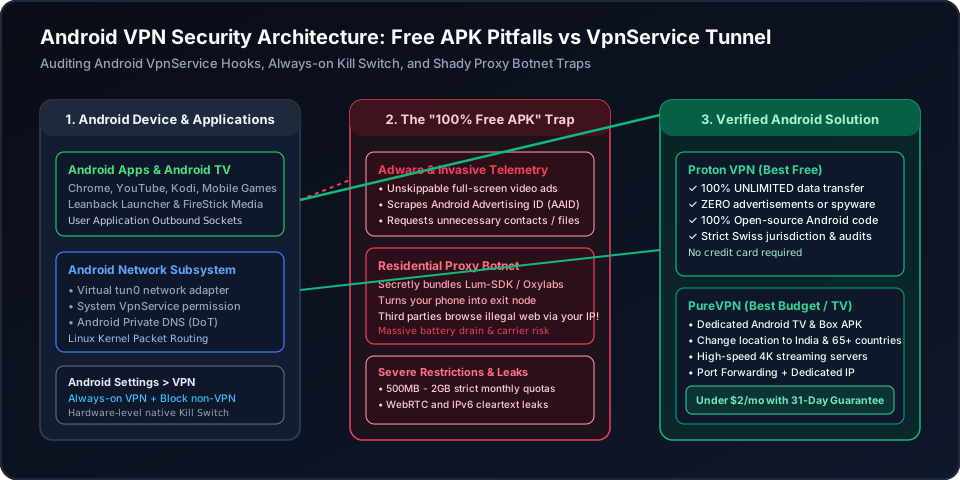
Figure 1: Architectural inspection of Android network sockets. Shady APKs intercept unencrypted app traffic to inject advertising identifiers and sell bandwidth into proxy networks, whereas verified WireGuard implementations bind to Android's virtual tun0 interface with full kernel encryption.
Android VPN Safety & Suitability Evaluator
Select your specific Android device use case to evaluate risk levels, bandwidth requirements, and optimal configuration steps.
Daily Web Browsing & Social Media
Proton VPN Free (Unlimited Data, Zero Ads)
Unlimited bandwidth essential
Standard Phone UI / Leanback APK
Enable Android Settings > VPN > Always-on VPN
The Best Verified Android VPN Services (Free vs Budget)
Skip the shady ad-stuffed APK traps. These two verified services deliver bulletproof privacy and native Android performance.
Proton VPN
- 100M+ Proton accounts across its privacy ecosystem
- Five consecutive annual independent no-logs audits
- Open-source VPN apps with public code
- 30-day refund window for eligible paid-plan purchases
2-year plan
PureVPN
- 3M+ users and operating since 2007
- Fourth consecutive independent no-log assessment
- ISO 27001-certified information security program
- 31-day refund window for eligible initial purchases
5-year plan·$1.69/mo $12.95/mo
This page contains affiliate links. If you sign up through them, NAT Checker may earn a commission at no extra cost to you.
Proton VPN for Android
Proton VPN operates under Switzerland's strict data protection framework and is audited annually by independent cybersecurity firms. Its free tier is the gold standard for mobile privacy.
- 100% Unlimited Data: No 500MB throttling; run all your daily browsing for free forever.
- Zero In-App Ads or Trackers: No invasive ad SDKs; Android APK is open-source on GitHub.
- No Payment Details Needed: Register with a basic email without ever entering credit card data.
PureVPN for Android & TV
Free VPNs cannot afford to maintain Indian or specialized streaming servers. If you need full Android TV remote support, Indian virtual IP locations, or P2P torrenting, PureVPN is the most cost-effective choice.
- Dedicated Android TV Leanback APK: Effortless D-pad remote navigation on smart TVs and FireSticks.
- Change Location to India & 65+ Countries: Access regional streaming catalogs and gaming matchmaking.
- P2P & Port Forwarding Compatible: Use P2P-supported locations for torrents; port forwarding and Dedicated IP are optional paid add-ons.
How to Setup a Safe Free VPN on Android & Android TV
Step-by-step instructions to install an audited Android VPN, configure native Always-on protection, and test connection integrity.
- 11. Install Verified App from Google Play or Official GitHub
Download Proton VPN or PureVPN directly from the Google Play Store or obtain the official signed APK from Proton's GitHub repository. Never install cracked APKs from unknown forums.
- 22. Grant Android VpnService Connection Request
When opening the app and connecting for the first time, Android displays a system security dialog: "Connection request: App wants to set up a VPN connection". Tap OK to authorize the virtual network interface (tun0).
- 33. Configure Android Always-on VPN & Kill Switch
Go to Android Settings > Network & internet > VPN. Tap the gear icon next to your installed VPN and enable "Always-on VPN". Toggle on "Block connections without VPN" for full fail-safe leak prevention.
- 44. Connect to the Fastest Available Server Node
In the Proton VPN app, tap "Quick Connect" to link to the lowest-latency server. For Android TV, use the directional D-pad on your remote to select your preferred server stream.
- 55. Verify Masked Public IP and DNS Leak Integrity
Open Chrome or Firefox on your Android device and visit our NAT & IP checker tool. Ensure your carrier IPv4/IPv6 address is masked and DNS queries resolve exclusively through the encrypted tunnel.
Frequently Asked Questions
Clear, authoritative answers regarding free Android VPN apps, APK security, and Android TV setups.