NAT-PMP Explained: Fix Gateway Errors & Setup Port Forwarding
What is NAT-PMP? Learn how NAT-PMP compares to UPnP, why routers or Proton VPN say gateway unsupported, and how to automate port forwarding safely.
Quick Answer
NAT Port Mapping Protocol (NAT-PMP, RFC 6886) is an automated protocol designed by Apple that allows computers on a private local network to request public port forwarding mappings from their default gateway. Unlike bulky and vulnerability-prone UPnP, NAT-PMP uses simple, lightweight UDP messages (UDP port 5351). However, clients like qBittorrent, Gluetun, or Warframe frequently report "the gateway does not support nat-pmp" or "nat-pmp malfunctioning" because most consumer ISP routers disable it, upstream CGNAT drops incoming requests, or Docker containers point to the wrong gateway interface. If your router lacks NAT-PMP or you are trapped behind CGNAT, Proton VPN paid P2P connections use NAT-PMP for assigned changing ports, while PureVPN’s paid forwarding add-on supports selected-port or all-ports policies on eligible connections—both working as simply as installing an app and clicking a toggle switch.
NAT-PMP operates over compact binary UDP datagrams on port 5351, delivering zero-latency port leases without UPnP’s XML overhead.
"Gateway does not support NAT-PMP" triggers when ISP routers lack a daemon, CGNAT drops packets, or Docker points to the wrong NIC.
Proton VPN natively runs NAT-PMP across WireGuard tunnels, automatically provisioning open inbound ports for qBittorrent & games.
NAT-PMP Gateway Compatibility & Error Diagnoser
Stuck with "gateway does not support nat-pmp" or inactive seeding ports? Select your application and network topology to pinpoint the root cause.
Standard ISP modem/routers (Comcast, AT&T, TP-Link stock) only implement UPnP or lock out UDP 5351 entirely.
Enable UPnP on your router, flash open-source firmware (OpenWrt with miniupnpd), or bypass router hardware using Proton VPN.
NAT-PMP vs. UPnP: Why Apple Engineered a Leaner Alternative
Explore how UPnP’s bloated architecture led to serious security flaws, and how NAT-PMP replaced it with minimal binary UDP frames:
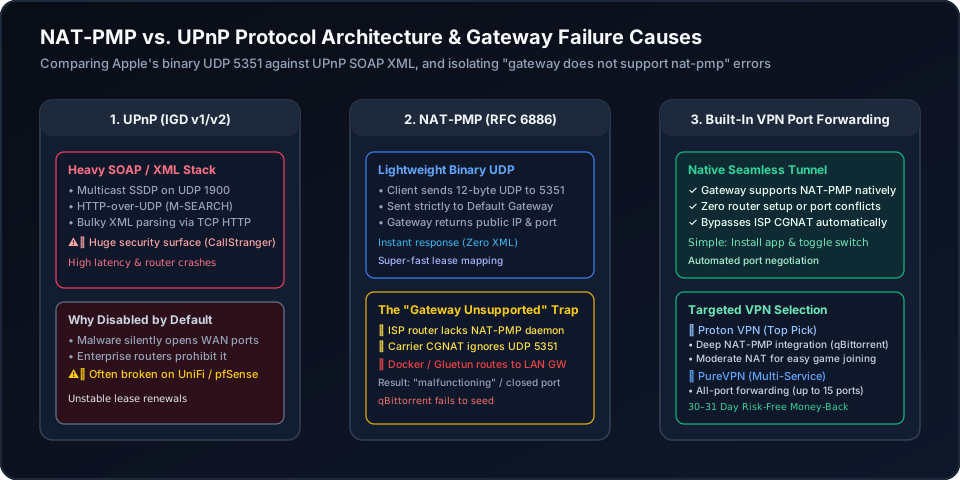
Universal Plug and Play relies on SSDP multicast (UDP 1900) followed by HTTP control calls over TCP, exchanging verbose SOAP/XML messages. This complexity has triggered severe vulnerabilities (e.g. CallStranger and WAN injection), leading cybersecurity experts and enterprise firewall vendors to strictly ban UPnP.
Apple designed NAT-PMP (RFC 6886) to eliminate XML entirely. A client sends a 12-byte UDP packet directly to its default gateway on port 5351. The gateway replies with an open public port and lease duration in milliseconds. Because requests cannot be spoofed across subnets, NAT-PMP is dramatically faster, lighter, and far safer.
Why Does Your Client Report "The Gateway Does Not Support NAT-PMP"?
Network applications and torrent clients trigger this specific error under four predictable conditions:
Most stock ISP modems and entry-level home routers only bundle a minimal UPnP daemon, completely ignoring UDP 5351. Unless you flash third-party firmware like OpenWrt or configure custom firewall rules, the gateway simply drops the request.
In containerized setups (like unRAID binhex-qbittorrentvpn), the toolnatpmpc attempts to query the container's default gateway. If the default gateway points to the Docker bridge (172.17.0.1) rather than the VPN tunnel endpoint (10.2.0.1), the query times out immediately.
If your broadband provider places your WAN IP in the 100.64.0.0/10 range, your router does not possess a public IP. Even if your local router supports NAT-PMP, the carrier’s CGNAT gateway will not accept your port mapping requests.
NAT-PMP port mappings are leased, typically for 3600 seconds. If an application crashes or fails to send renewal heartbeats, the gateway closes the port mapping, causing active torrents to stall and multiplayer games to disconnect.
natpmpc -a 1 0 udp 60 && natpmpc -a 1 0 tcp 60This requests a public port mapping for internal port 1 with a 60-second lease. If querying a VPN gateway specifically, add the -g 10.2.0.1 flag to target the VPN tunnel interface.
Protocol Comparison: UPnP vs. NAT-PMP vs. Dedicated VPN Port Forwarding
Compare security, resource overhead, and setup requirements across all three port mapping technologies:
| Feature / Capability | UPnP (IGD v1/v2) | NAT-PMP (RFC 6886) | Native VPN Port Forward (Recommended) |
|---|---|---|---|
| Protocol & Transport | SSDP (UDP 1900) + SOAP/XML (TCP HTTP) | Binary Datagrams over UDP (Port 5351) | Encrypted WireGuard/OpenVPN Control Channel |
| Security & Exploit History | Vulnerable (CallStranger, WAN injection) | Secure: Only accepts requests from local subnet | Isolated: Zero exposure to local LAN vulnerabilities |
| Router Resource Impact | High (Complex XML DOM parsing, causes crashes) | Extremely Low (12-byte binary datagrams) | Zero load on home gateway router |
| Carrier CGNAT Resistance | Fails completely (Upstream gateway drops it) | Fails completely on residential ISP lines | 100% CGNAT & Double NAT Bypass |
| Port Assignment Persistence | Leases often expire or desync | Lease renewal required (e.g. every 3600s) | Proton: Dynamic NAT-PMP; Pure: Persistent Fixed Ports |
| Setup Simplicity | Hit-or-miss router setting | Requires custom router daemon (miniupnpd) | Effortless: Install app & toggle switch |
Automate NAT-PMP Without Router Headaches: The 1-Click VPN Solution
Tired of battling locked ISP routers, configuring fragile Docker scripts, or suffering from stalled torrents? The VPN port-forwarding approach is remarkably simple—just like installing an application and clicking a feature toggle switch.
By using a provider with native NAT-PMP support, your client automatically negotiates and renews inbound ports over the secure tunnel. You completely bypass local router limitations and upstream ISP CGNAT with zero manual firewall edits:
Proton VPN
- Native NAT-PMP integration: qBittorrent & Gluetun negotiate dynamic ports automatically
- Exclusive Moderate NAT feature improves peer matchmaking in games like Warframe & CoD
- Simple: install the desktop app and toggle the port forwarding switch
- 100M+ accounts across privacy ecosystem, 5 independent audits, and 30-day refund window
2-year plan
PureVPN
- All-port forwarding mode, or specific ports added up to 15 at a time in the member area
- Fixed port assignments eliminate dynamic NAT-PMP lease expiration headaches
- Completely bypasses local router UPnP/NAT-PMP bugs and ISP Carrier NAT
- 3M+ users, ISO 27001 certified, and 31-day risk-free money-back guarantee
5-year plan·$1.69/mo $12.95/mo
This page contains affiliate links. If you sign up through them, NAT Checker may earn a commission at no extra cost to you.
How to Troubleshoot and Fix NAT-PMP Port Forwarding Failures
Step-by-step diagnostic workflow to resolve gateway unsupported errors, configure router daemons, fix Docker routing, and automate VPN port mapping.
Verify whether your primary router runs a NAT-PMP daemon. While OpenWrt, DD-WRT, and pfSense support miniupnpd with NAT-PMP enabled, default firmware on ISP modems (like AT&T, Comcast, or Vodafone) strictly blocks or ignores UDP port 5351 requests.
If running qBittorrent in Docker or unRAID (binhex-qbittorrentvpn / Gluetun), verify that `natpmpc` queries the internal VPN tunnel gateway IP (such as 10.2.0.1) rather than your Docker bridge or local physical LAN gateway (192.168.1.1).
Compare your router WAN address with your public IP on natchecker.com. If your WAN IP falls within 100.64.0.0/10, upstream ISP CGNAT discards all inbound traffic regardless of local router settings.
NAT-PMP port mappings are temporary leases (default 3600 seconds). Ensure your client application or scripting keeps sending heartbeat refresh packets to prevent the gateway from closing your listening port during long downloads.
Use Proton VPN paid P2P forwarding: the supported desktop app requests and renews the assigned port, while manual profiles need a NAT-PMP client. PureVPN’s paid forwarding add-on supports selected-port or all-ports policies on eligible connections. Match the listener and firewall to the active port.
Related Network Automation & Port Forwarding Guides
Deepen your network architecture knowledge with our companion troubleshooting guides:
Frequently Asked Questions About NAT-PMP
Clear, authoritative answers addressing common queries about NAT-PMP, UPnP differences, and gateway errors.
This page contains affiliate links. If you sign up through them, NAT Checker may earn a commission at no extra cost to you.