Hairpin NAT Explained: Fix NAT Loopback & Local Port Forwarding
Cannot access your port-forwarded server from your home LAN? Learn how hairpin nat and NAT loopback work, why router connections fail, and how to fix it.
Quick Answer
Hairpin NAT (also called NAT loopback or NAT reflection) allows devices on an internal local area network (LAN) to access a self-hosted server using the router’s public WAN IP address or DDNS domain name. Without hairpin NAT, your router forwards the packet to the server, but the server replies directly to the client’s local IP address via the switch—bypassing the router. Because the client expects a reply from the public WAN IP, it immediately resets the connection (TCP RST), causing timeout or connection refused errors. While you can write complex SNAT masquerade rules on routers like MikroTik, pfSense, or UniFi, they strip client IP logs and risk breaking WAN traffic. A simpler, risk-free bypass is establishing a dedicated VPN port-forwarding tunnel with Proton VPN or PureVPN, which lets internal and external traffic connect seamlessly through the same public port without touching fragile router firewall tables.
Standard routers drop packets when the source and destination reside on the same LAN subnet unless bidirectional translation is active.
Without hairpin NAT, servers reply directly through the switch, sending un-translated LAN packets that clients instantly reject.
A port-forwarding VPN tunnel routes traffic through an external interface, eliminating loopback conflicts without fragile router edits.
Hairpin NAT Failure Diagnoser & Router Compatibility Checker
Select your router environment, self-hosted service, and observed symptom below to receive an instant root-cause analysis and resolution roadmap.
Firmware strictly strips internal reflection; no CLI or advanced firewall options.
Cannot fix via router settings. Requires split DNS or a VPN tunnel bypass.
Why Standard NAT Drops Your Connection: The TCP Handshake Deadlock
To understand why hairpin nat is necessary, trace how TCP packets traverse your local network switch and router when attempting to reach your server through your public domain:
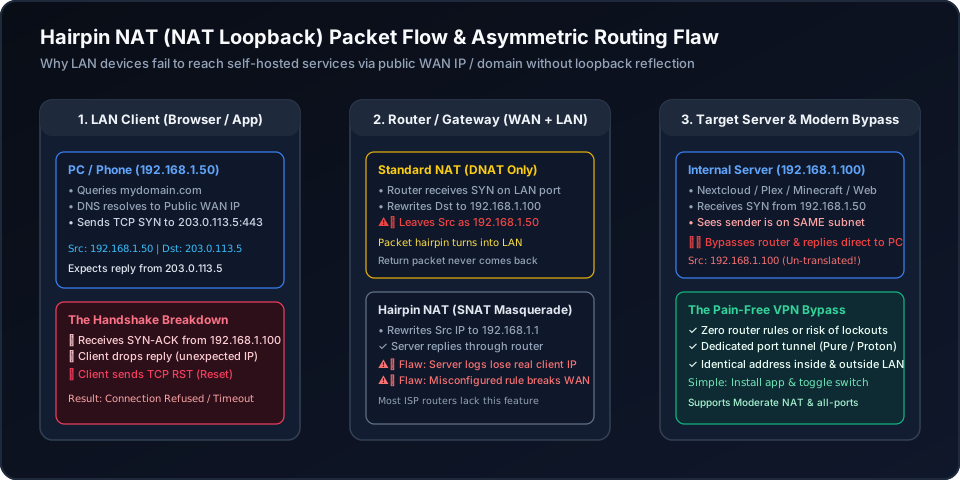
Your PC (192.168.1.50) resolves your domain to your WAN IP (203.0.113.5) and sends a TCP SYN packet to the gateway.
The router translates the destination IP to the server (192.168.1.100) and routes it back into the LAN, leaving the source IP unchanged as 192.168.1.50.
The server sees the sender is on the same local subnet, so it replies directly to the PC via the switch. The PC rejects this un-translated reply with a TCP RST because it expected a response from the public WAN IP!
Why Traditional Hairpin NAT Rules Create Serious Security & Logging Flaws
Networking forums often suggest adding a Source NAT (SNAT masquerade) rule or setting up Split-Horizon DNS. While technically functional, both methods introduce significant engineering compromises:
To force the server to reply through the router, hairpin nat rewrites the source IP of all internal clients to the router’s own LAN gateway IP (192.168.1.1).
- • Access Logs Ruined: Every internal user, phone, and tablet appears in Nginx/Apache logs as the gateway IP.
- • Fail2ban Blinded: Automated security tools cannot ban rogue internal devices without blocking the entire router gateway!
- • Rate Limiting Broken: Reverse proxies treat all internal requests as coming from a single IP, causing false rate-limit bans.
Split DNS maps your domain to the private local IP (192.168.1.100) inside your house. However, modern client software increasingly bypasses local DNS:
- • DNS-over-HTTPS (DoH): Chrome, Firefox, and Android frequently bypass local router DNS in favor of encrypted public resolvers.
- • Apple Private Relay: iOS and macOS route DNS through Apple relays, receiving the public WAN IP and failing loopback anyway.
- • Wi-Fi Transition Lag: Moving between cellular 5G and home Wi-Fi causes stale DNS caching and SSL certificate mismatches.
/ip firewall nat add chain=srcnat src-address=192.168.88.0/24 dst-address=192.168.88.100 protocol=tcp dst-port=443 out-interface=bridge action=masquerade⚠️ Caution: If you forget to specify dst-address or mistakenly setout-interface-list=WAN, your router will masquerade all outbound internet traffic through the bridge, cutting off your entire household's connectivity.
Method Comparison: Hairpin NAT vs. Split DNS vs. VPN Port Forwarding
Evaluate how each solution balances setup complexity, client logging, and overall network reliability:
| Evaluation Metric | Router Hairpin NAT | Split-Horizon DNS | VPN Port Forwarding (Recommended) |
|---|---|---|---|
| Setup Effort | High: Requires dual NAT firewall rules (DNAT + SNAT) | Medium: Setup local DNS server (Pi-hole/AdGuard) | Very Simple: Install app & click the feature switch |
| Preserves Client Source IP | No: SNAT masks all internal devices as router IP | Yes: Direct local connection | Yes: Traffic reaches server via dedicated tunnel endpoint |
| ISP Modem Compatibility | Fails: Most consumer ISP modems lack loopback | Works: Bypasses router routing entirely | Works: Completely independent of ISP hardware |
| Mobile / DoH Compatibility | Works on local Wi-Fi | Fails: DoH / Apple Private Relay ignores local DNS | Works seamlessly everywhere without DNS conflicts |
| Risk of Network Outage | High: Syntax errors can redirect all internet outbound | Low: Only internal domain affected | Zero: Does not alter existing router firewall tables |
| Port Range Flexibility | Limited to router port forward rules | All ports (same local IP) | Proton: 1 port; PureVPN: all ports, or specific ports up to 15 at a time |
Bypass Hairpin NAT Completely: The 1-Minute VPN Port Forwarding Solution
Why spend hours troubleshooting fragile iptables or dealing with locked ISP routers? The VPN port-forwarding approach is remarkably simple—just like installing an application and clicking a feature toggle switch.
By running a port-forwarding VPN client on your server or hosting device, incoming traffic reaches your service through an external, publicly accessible VPN port rather than your local gateway’s WAN/LAN boundary. Because both external visitors and internal devices connect through this dedicated external endpoint, local hairpin routing deadlocks and ISP Carrier-Grade NAT (CGNAT) restrictions vanish instantly.
PureVPN
- All-port forwarding mode, or specific ports added up to 15 at a time
- Dedicated IP add-on available for seamless, persistent remote domain mapping
- Completely bypasses local hairpin NAT loops and ISP carrier modem lockouts
- 3M+ users, ISO 27001 certified, and 31-day risk-free money-back guarantee
5-year plan·$1.69/mo $12.95/mo
Proton VPN
- 1 dedicated forwarded port with zero router firewall configuration required
- Built-in Moderate NAT feature enhances peer-to-peer matchmaking for gaming
- Simple: install the desktop app and toggle the port forwarding switch
- 100M+ privacy accounts, 5 independent audits, and 30-day refund window
2-year plan
This page contains affiliate links. If you sign up through them, NAT Checker may earn a commission at no extra cost to you.
How to Diagnose and Fix Hairpin NAT Connection Failures
Step-by-step troubleshooting workflow to identify NAT loopback connection resets, configure router reflection rules, and deploy hassle-free VPN port forwarding.
Disconnect your mobile phone or laptop from local Wi-Fi and connect via cellular 5G hotspot. If your service (Nextcloud, Plex, Minecraft, or Home Assistant) loads perfectly over cellular but hangs or refuses connection when connected to your home Wi-Fi using the exact same domain, you are experiencing a missing hairpin nat capability.
Log into your router admin panel. Prosumer firewalls (MikroTik RouterOS, pfSense, OPNsense, UniFi Dream Machine) support NAT loopback configuration, whereas most ISP-supplied modems and basic consumer routers lack the feature entirely or lock it down in firmware.
On supporting routers, create a Source NAT (SNAT) masquerade rule for traffic originating from the LAN subnet destined for the internal server IP. This forces the server to send return packets back to the router so the router can translate the source IP back to the public WAN IP.
Be aware that router-based hairpin nat rewrites all internal client IP addresses to the router’s gateway IP. Your web server logs, fail2ban filters, and rate limiters will see every internal client as the router, blinding your intrusion detection and access control.
If your ISP router lacks NAT loopback or you want to avoid risky firewall edits, bypass the issue using a port-forwarding VPN. The VPN assigns a dedicated public port tunnel that works identically inside and outside your LAN, requiring zero router modifications.
Related Network & Port Forwarding Guides
If your port forwarding setup continues to face connectivity roadblocks, explore our in-depth router and CGNAT guides:
Frequently Asked Questions About Hairpin NAT
Clear answers to the most common queries regarding NAT loopback, Split DNS, and external port accessibility.
- IETF RFC 4787: NAT Behavioral Requirements for Unicast UDP
- IETF RFC 6598: Shared Address Space (100.64.0.0/10 CGNAT)
- MikroTik Documentation: RouterOS 7 Destination & Source NAT
- Ubiquiti Help Center: DNAT, SNAT, and Masquerading in UniFi
- Proton VPN: Port Forwarding & Moderate NAT Documentation
- PureVPN Support: Port Forwarding Addon & Dedicated IP Specs
This page contains affiliate links. If you sign up through them, NAT Checker may earn a commission at no extra cost to you.