DMZ Router Guide: Meaning, Gaming Setup & Risks (2026)
What is a DMZ on a router? Learn how router DMZ works, why using DMZ for PS5 or gaming fails under CGNAT, security risks, and safe VPN fixes.
Quick Answer
A DMZ (Demilitarized Zone) on a consumer router is a "Default Host" setting that forwards all unsolicited incoming internet traffic across all 65,535 ports to a single designated local IP address. While often recommended on gaming forums to fix Strict NAT (NAT Type 3) on PS5, Xbox, or PC, it strips away your router’s firewall, exposing your device to automated botnet port scans and ransomware. Crucially, if your ISP uses Carrier-Grade NAT (CGNAT, 100.64.0.0/10), placing a console in the DMZ will NOT fix Strict NAT because inbound packets are discarded at the ISP gateway before reaching your house. Instead of risking full network exposure or fighting double NAT, Proton VPN provides an exclusive Moderate NAT feature that optimizes peer matchmaking for gaming, while PureVPN offers secure all-port forwarding—both as simple as installing an app and clicking a toggle switch.
In any DMZ router configuration, all 65,535 unsolicited inbound ports are forwarded to one internal IP, bypassing perimeter firewall filters entirely.
Enabling DMZ will NOT fix Strict NAT (Type 3) if your ISP uses CGNAT, because incoming packets are discarded before reaching your router.
Proton VPN provides Moderate NAT optimization for peer matchmaking, giving gamers Open/Moderate NAT without exposing home hardware.
DMZ Router Safety & NAT Type Feasibility Evaluator
Thinking of placing your PS5, gaming PC, or secondary router into a DMZ? Select your hardware and ISP topology to evaluate the security risk and likelihood of improving NAT type.
Upstream Carrier-Grade NAT (100.64.0.0/10) blocks all inbound WAN traffic. Opening a local DMZ is like removing your front door while the building gate is locked.
DMZ cannot fix CGNAT. Use Proton VPN with Moderate NAT or PureVPN with all-port forwarding to bypass CGNAT completely.
How a DMZ Router Setup Works: The "Default Host" Inundation
Unlike an enterprise multi-homed DMZ with isolated VLANs and perimeter firewalls, a residential DMZ router rule is simply a wildcard NAT forward:
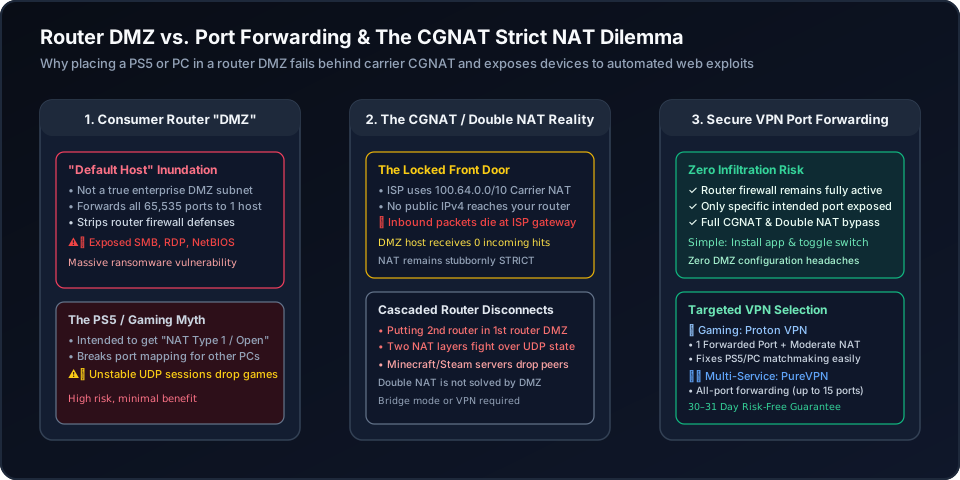
In consumer firmware, enabling a DMZ router entry designates a single private IP (e.g. 192.168.1.100) as the recipient of every single unmatched packet hitting your router. Your router’s stateful firewall inspection is disabled for this host. Every port scanner, malicious botnet script, and DDoS attempt reaches that device directly.
Port forwarding explicitly opens only specified ports (e.g. UDP 3074 for Call of Duty), keeping all remaining 65,534 ports strictly firewalled. Alternatively, a VPN tunnel bypasses router configuration entirely by routing traffic through an encrypted virtual interface with integrated Moderate NAT.
Why a DMZ Router Rule Fails Gaming Matchmaking & Endangers Home Networks
Before toggling a DMZ router rule, examine the three technical reasons it frequently causes more harm than good:
If your ISP allocates an IP address in the 100.64.0.0/10 range, your router does not have an external public address. Unsolicited internet traffic never reaches your router in the first place! Putting a console in a DMZ router host when behind CGNAT is like opening your front door while the apartment building’s main gate is locked.
Windows PC and NAS operating systems run background services like SMB file sharing (TCP 445), Remote Desktop (TCP 3389), and NetBIOS. Placing a PC in a DMZ router host allows automated ransomware bots to brute-force your computer within minutes.
Gamers frequently connect their own Wi-Fi router to an ISP modem and place the second router in the modem’s DMZ. Because both devices still maintain separate NAT translation tables, UDP session states frequently desynchronize, causing gaming disconnects.
If you have two PS5s, Xboxes, or gaming PCs in the same home, giving the DMZ router slot to one device prevents UPnP from routing shared gaming ports (like UDP 3074) to the second device, forcing the second player into permanent Strict NAT.
Method Comparison: DMZ Router vs. Port Forwarding vs. Gaming VPN
Evaluate the tradeoffs in security, CGNAT penetration, and gaming matchmaking reliability:
| Criterion | Router DMZ (Default Host) | Selective Port Forwarding | Gaming VPN (Proton / PureVPN) |
|---|---|---|---|
| Exposed Port Range | All 65,535 TCP/UDP Ports simultaneously | Only explicitly configured target ports (e.g. 25565) | Dedicated tunnel port; router firewall stays 100% active |
| Security & Malware Exposure | Catastrophic: SMB (445), RDP (3389) exposed to botnets | Minimal: Only intended service daemon reachable | Isolated: Zero exposure of local home network |
| CGNAT Bypass Capability | Zero: Dropped at upstream carrier gateway | Zero: Cannot open ports through CGNAT | 100% CGNAT & Strict NAT Bypass |
| Gaming NAT Type Impact | Can achieve Type 1/Open only with public IPv4 | Achieves Moderate / Open NAT safely | Moderate NAT feature optimizes matchmaking instantly |
| Impact on Other LAN Devices | Breaks UPnP port claims for other PCs & consoles | Selective: Different ports map to different hosts | Completely isolated to the client running the VPN |
| Configuration Complexity | Requires static IP on client + router DMZ IP entry | Manual rule creation for each port and protocol | Very Simple: Install app & toggle switch |
Fix Strict NAT Without Dangerous DMZ Exposure: The 1-Click VPN Solution
Why risk exposing your home network to ransomware or struggling with double NAT routing tables? The VPN port-forwarding approach is remarkably simple—just like installing an application and clicking a feature toggle switch.
A gaming-optimized VPN bypasses ISP CGNAT at the tunnel layer. Your router’s firewall remains 100% active, while your gaming device receives optimized NAT behavior and an external open port:
Proton VPN
- Exclusive Moderate NAT feature improves peer matchmaking without exposing your LAN
- 1 dedicated forwarded port for self-hosting Minecraft or P2P multiplayer sessions
- Simple: install the desktop app and toggle the port forwarding switch
- 100M+ accounts across privacy ecosystem, 5 independent audits, and 30-day refund window
2-year plan
PureVPN
- All-port forwarding mode, or specific ports added up to 15 at a time in the member area
- Securely exposes only selected ports, avoiding catastrophic DMZ whole-host exposure
- Completely bypasses local router firewall quirks and ISP Carrier-Grade NAT (CGNAT)
- 3M+ users, ISO 27001 certified, and 31-day risk-free money-back guarantee
5-year plan·$1.69/mo $12.95/mo
This page contains affiliate links. If you sign up through them, NAT Checker may earn a commission at no extra cost to you.
How to Troubleshoot Gaming NAT Without Dangerous DMZ Exposure
Step-by-step diagnostic roadmap to identify CGNAT, resolve console strict NAT, configure precise port rules, and deploy secure VPN forwarding.
Before touching router DMZ settings, check your router’s WAN IP. If it begins with 100.64.0.0/10 (RFC 6598), your ISP uses CGNAT. DMZ will have zero effect on your NAT type because the external public IP is shared among hundreds of subscribers.
If you have a modem-router combo from your ISP connected to your own Wi-Fi router, placing the second router in the first router’s DMZ causes intermittent UDP session drops. Switch the ISP modem to true Bridge Mode or IP Passthrough instead.
For consoles (PS5/Xbox) or game servers (Minecraft/FiveM), create targeted port forwarding rules for only the specific ports needed (e.g. UDP 3074, 3478-3480) rather than exposing all 65,535 ports via DMZ.
Never place a Windows PC, NAS, or unpatched device into a router DMZ. Automated internet bots actively scan for open SMB (port 445), RDP (port 3389), and Telnet (port 23) to deploy automated ransomware.
When upstream ISP restrictions prevent open NAT, deploy Proton VPN. Its built-in Moderate NAT feature optimizes peer-to-peer matchmaking without exposing your home LAN, while PureVPN provides all-port forwarding support.
Related Console NAT & Router Guides
Explore our complete collection of console optimization and router troubleshooting resources:
Frequently Asked Questions: Router DMZ Settings & Gaming
Authoritative answers to common questions about router DMZ settings, security risks, and console gaming.
This page contains affiliate links. If you sign up through them, NAT Checker may earn a commission at no extra cost to you.