Firezone VPN Guide: WireGuard, CGNAT & Alternatives (2026)
Deploy Firezone WireGuard remote access past CGNAT. Configure web admin portals, resolve connection timeouts, and compare frictionless port forwarding VPNs.
Quick Answer: What Is Firezone VPN and How Does It Handle WireGuard Behind CGNAT?
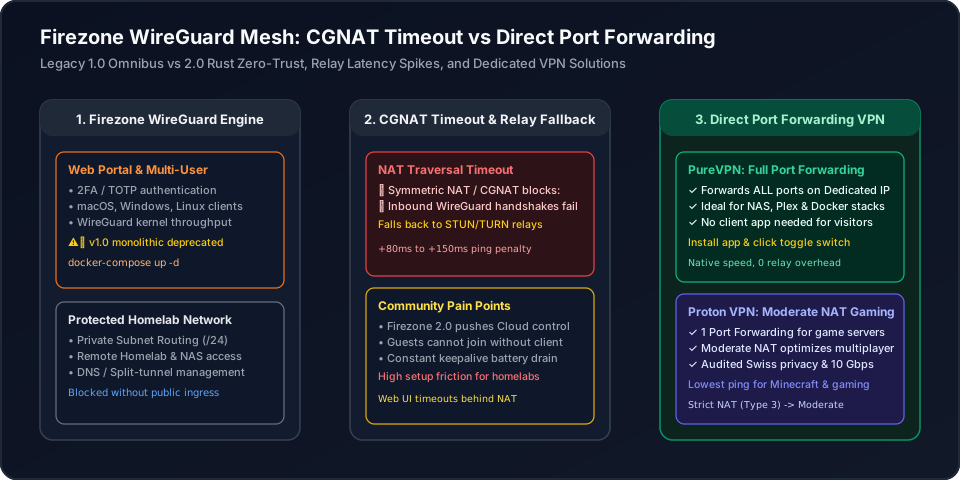
Firezone is an open-source remote access platform built on WireGuard that provides a multi-user Web GUI, two-factor authentication (2FA), and zero-trust granular access controls for private subnets. While legacy Firezone 1.0 offered a standalone self-hosted omnibus gateway, modern Firezone 2.0 has evolved into a distributed Rust-based zero-trust network with a cloud-managed control plane. Behind Carrier-Grade NAT (CGNAT) or Symmetric NAT on cellular 5G and Starlink, Firezone gateways struggle with inbound UDP connection timeouts: without an open public port or STUN/TURN relays, direct peer-to-peer handshakes fail, forcing traffic through high-latency relay hops (+80ms to +150ms). For homelabbers, media streamers, and gamers who need instant remote connectivity without managing relay servers or cloud control tiers, a dedicated commercial VPN with native port forwarding—such as PureVPN for full multi-port forwarding or Proton VPN with Moderate NAT optimization—is remarkably simple, working just like installing an app and clicking a toggle switch.
Firezone VPN Guide: WireGuard Engine, Web UI & CGNAT Reality
Firezone is an open-source remote access and zero-trust networking platform built on the modern WireGuard protocol. Designed as an alternative to proprietary corporate VPNs and complex WireGuard configuration files, Firezone provides a responsive Web GUI, multi-user access controls, two-factor authentication (2FA), and native desktop clients for macOS, Windows, and Linux.
However, understanding Firezone requires distinguishing between Firezone 1.0 (the legacy self-hosted Linux omnibus package) and Firezone 2.0 (the modern distributed Rust zero-trust architecture). When deploying Firezone on home broadband behind Carrier-Grade NAT (CGNAT) or cellular 5G, inbound WireGuard handshakes face severe connection timeout obstacles.
Interactive Firezone WireGuard NAT Traversal Analyzer
Select your intended homelab service, upstream router NAT condition, and connectivity architecture to predict connection success:
When hosting Firezone behind Symmetric CGNAT (common on 5G cellular broadband and Starlink), inbound WireGuard UDP packets are silently discarded by the ISP firewall. Direct peer-to-peer hole punching fails, forcing connections through public TURN relay servers that add 80ms–150ms of ping latency and throttle streaming bandwidth.
Firezone Deployment: Docker Gateway, macOS Client & Policies
Deploying Firezone involves running the Gateway daemon on your target host, inviting users, and establishing client tunnels. Use the interactive configuration tabs below to copy verified setup commands:
# Production Firezone Gateway Deployment (Docker Compose)
# Requires official Firezone token from your management portal
version: '3.8'

services:
  firezone-gateway:
    image: firezone/gateway:latest
    container_name: firezone-gateway
    restart: unless-stopped
    cap_add:
      - NET_ADMIN
      - SYS_MODULE
    sysctls:
      - net.ipv4.ip_forward=1
      - net.ipv4.conf.all.src_valid_mark=1
      - net.ipv6.conf.all.forwarding=1
    environment:
      - FIREZONE_TOKEN=YOUR_GATEWAY_TOKEN_HERE
      - FIREZONE_NAME=homelab-gateway
      - FIREZONE_LOG_LEVEL=info
    volumes:
      - /lib/modules:/lib/modules:ro
network_mode: hostResolving Firezone Community Dilemmas: 1.0 vs 2.0 & CGNAT Timeouts
Self-hosters and sysadmins across Reddit frequently discuss the operational complexities of Firezone deployments:
"Looking for WireGuard web app with multi-user support after Firezone changes"
The Community Frustration: Homelabbers who loved Firezone 1.0 for its single-command omnibus installation and self-contained Web UI were frustrated when version 2.0 shifted toward a SaaS-coordinated zero-trust architecture, leaving them searching for simple alternatives.
The Engineering Reality: While Firezone 2.0 provides enterprise-grade Rust performance and granular ZTNA policies, running a pure standalone self-hosted control plane is no longer the primary focus of the project. If you just want a reliable tunnel to your home network without cloud accounts or user fees, commercial VPN port forwarding offers a vastly simpler path.
"WireGuard connection timeouts behind CGNAT & remote admin portal failure"
The Performance Bottleneck: A remote homelab user deployed a WireGuard gateway on a home fiber connection operating under carrier CGNAT. Because the ISP firewall dropped incoming UDP handshakes, clients experienced continuous connection timeouts unless routed through high-latency STUN/TURN relays.
The Permanent Fix: Relaying WireGuard through public TURN nodes adds 80ms–150ms of ping lag and throttles file transfers. Bypassing CGNAT cleanly requires a dedicated public endpoint, which commercial port-forwarding VPNs deliver out of the box.
Firezone vs Tailscale vs NetBird vs Dedicated Port Forwarding VPNs
Compare Firezone against mesh alternatives like Tailscale, NetBird, and dedicated commercial port forwarding solutions:
| Evaluation Factor | Firezone (Rust ZTNA) | Tailscale / NetBird | PureVPN / Proton VPN |
|---|---|---|---|
| Core Architecture | WireGuard Gateway with Rust zero-trust control plane | Mesh overlay using WireGuard & coordination server | Dedicated WireGuard / OpenVPN port forwarding gateway |
| Web UI & Multi-User Support | Native Web Portal with 2FA / TOTP and SSO | Managed Cloud Admin Console (or Headscale) | Native desktop/mobile apps with 1-click feature toggles |
| CGNAT Connection Timeout Behavior | Fails unless STUN/TURN relays are configured (+90ms lag) | Falls back to public DERP relays (+120ms ping) | Zero timeouts: Clean dedicated public IP eliminates CGNAT |
| Guest & External Friend Access Friction | High: every user must install client app & authenticate | Very High: requires Tailscale client on all devices | Zero: guests join directly via IP:Port or standard DNS |
| Port Forwarding Capabilities | Internal private routing only (no public exposure) | Tailscale Funnel (limited bandwidth & ports) | PureVPN: paid forwarding add-on; Proton: 1 assigned port or Moderate NAT |
| Setup & Maintenance Effort | Moderate to High (Gateway setup, IdP, relay infrastructure) | Low (Proprietary cloud control) | Zero: Install application and toggle port forwarding on |
The Effortless Zero-Lag Alternative: Dedicated Port Forwarding VPNs
While Firezone is an impressive platform for enterprise remote access policies and WireGuard gateway routing, deploying it for personal homelab access or multiplayer gaming forces you to manage STUN/TURN relays, navigate cloud SaaS seat tiers, and force every friend to install client software.
By contrast, a commercial VPN solution is remarkably simple—working just like installing an app and clicking a feature toggle switch. There is no need to configure Docker sysctls, rent cloud relay servers, or troubleshoot WireGuard handshake timeouts behind CGNAT.
You get an unmetered, direct public connection straight to your local ports with native WireGuard speeds.
PureVPN
- Full Multi-Port Forwarding: Forward all required ports simultaneously for Synology NAS, Docker stacks, Nextcloud, and Plex.
- Dedicated Public IP: Gives your server a clean, static public IPv4 address that bypasses Starlink and 5G cellular CGNAT completely.
- Zero Client Friction for Guests: External friends and web clients connect directly using your IP or custom domain without installing any apps.
- App + Toggle Simplicity: No need to maintain STUN/TURN relays, configure gateway tokens, or manage user seats.
- Gigabit Bandwidth: Unthrottled 20 Gbps server backbone engineered for continuous 4K media streaming and large backups.
5-year plan·$1.69/mo $12.95/mo
Proton VPN
- Moderate NAT Optimization: Helps compatible P2P matchmaking using more consistent mappings on paid plans. Use port forwarding instead for a public server; the two modes cannot run together.
- Native 1-Port Forwarding: 1-click desktop toggle to forward TCP 25565 or UDP game ports cleanly through CGNAT.
- Lowest Ping Overhead: Eliminates the 100ms+ relay ping spikes of public overlay nodes with direct 10 Gbps WireGuard routing.
- Swiss Privacy Protection: Strictly audited zero-logs infrastructure legally protected outside EU/US surveillance alliances.
- 100% Open-Source Apps: Independently audited desktop and mobile clients with built-in kill switch and NetShield malware blocker.
2-year plan
This page contains affiliate links. If you sign up through them, NAT Checker may earn a commission at no extra cost to you.
How to Deploy Firezone or Upgrade to Dedicated Port Forwarding
1. Deploy Firezone Gateway via Docker Compose
Download the official docker-compose.yml template from the Firezone GitHub repository. Define environment variables including FIREZONE_TOKEN and gateway listening interfaces, then launch with "docker compose up -d".
2. Configure Admin Portal, Users and 2FA Policies
Access your Firezone web console or cloud management portal. Set up user directories, enforce two-factor authentication (TOTP), and define internal IP subnets (e.g. 192.168.1.0/24) for routing.
3. Install Firezone Client on macOS or Windows Devices
Install the Firezone native application on client endpoints. Open the app, enter your organization slug, authenticate through single sign-on, and confirm the WireGuard tunnel handshake.
4. Audit WireGuard Connection State and Relay Latency
Test ping and throughput to internal hosts. If latency spikes by 100ms+ or connections stall behind CGNAT, inspect firewall NAT tables to determine whether UDP packets are falling back to TURN relays.
5. Upgrade to Commercial Port Forwarding for Frictionless Access
For public game or media hosting without visitor VPN software, use PureVPN’s paid forwarding add-on for selected ports on eligible locations, or Proton VPN paid P2P forwarding for one configurable listener. Match the service and firewall to the actual forwarded port; use Moderate NAT separately for compatible P2P matchmaking.
Firezone, WireGuard & Remote Access FAQ
What is Firezone VPN used for and how does it work?↓
Firezone is an open-source remote access and Zero-Trust Network Access (ZTNA) platform built on the WireGuard protocol. It enables organizations and homelab administrators to securely connect remote devices (macOS, Windows, Linux, iOS, Android) to internal networks, cloud VPCs, and Docker containers through an encrypted tunnel governed by role-based access policies and single sign-on (SSO).
Is Firezone completely free and open source?↓
Yes, Firezone is open source under the Apache 2.0 license with public repositories on GitHub. Self-hosted deployments of the core gateway are free. For Firezone 2.0, the project offers a free tier for small teams (up to 6 users) using their managed SaaS control plane, with paid enterprise plans starting at $5 per user per month for advanced features like SAML IdP sync and dedicated relays.
What changed between Firezone 1.0 (legacy self-hosted) and Firezone 2.0?↓
Firezone 1.0 was a monolithic, self-hosted Linux omnibus package written in Elixir with an embedded WireGuard kernel module and integrated PostgreSQL database. Firezone 2.0 re-architected the stack from scratch in Rust, separating the control plane (cloud-managed by default) from lightweight distributed Gateways and Clients using STUN/TURN ICE NAT traversal, moving from standard point-to-site VPN to zero-trust resource-level tunneling.
Why does Firezone experience connection timeouts behind CGNAT or Symmetric NAT?↓
WireGuard requires direct UDP handshakes between client and gateway. Under Carrier-Grade NAT (RFC 6598 100.64.0.0/10) or Symmetric NAT, the ISP firewall assigns dynamic, unpredictable external port mappings for each destination and drops inbound packets. If STUN hole punching fails, Firezone sessions time out unless routed through public TURN relays, which introduce severe latency spikes and throughput limits.
How do you install and configure the Firezone client on macOS?↓
Download the official Firezone macOS client from the Mac App Store or Firezone GitHub releases. Install the menu bar application, authenticate with your organization account via browser OAuth, and grant Network Extension permissions. The client automatically syncs assigned IP routes and establishes encrypted WireGuard tunnels to reachable Gateways.
How does Firezone compare to Tailscale and NetBird?↓
All three use WireGuard for encrypted connectivity. Tailscale is a full mesh network where every peer communicates with every other peer using proprietary control infrastructure (or Headscale). NetBird provides an open-source mesh with self-hostable control planes and kernel WireGuard. Firezone focuses on secure gateway-to-resource zero-trust access, making it closer to enterprise ZTNA with granular policy routing rather than a flat peer mesh.
Why choose a commercial port-forwarding VPN over Firezone for self-hosting?↓
For public hosting without visitor software, use PureVPN’s paid forwarding add-on for selected ports on eligible locations, optionally with a Dedicated IP for a stable address. Proton VPN paid P2P connections provide one assigned port for a configurable service, and the number usually changes after reconnection. Set the service and firewall to the actual forwarded port.
Authoritative References & Internal Guides
Official Standards & Documentation
- Firezone Official Documentation & Architecture
Official technical specifications for Firezone Gateways, Clients, and Zero-Trust resources.
- Firezone Open-Source GitHub Repository
Public code repository for the Rust-based WireGuard client, gateway, and connection daemons.
- WireGuard: Fast, Modern, Secure VPN Tunnel (Jason A. Donenfeld)
Academic technical paper establishing the UDP-based handshake and cryptokey routing protocol.
- RFC 6598: Carrier-Grade NAT (CGNAT) 100.64.0.0/10 Prefix
IANA technical standard defining carrier address pooling that causes WireGuard handshake timeouts.
Related Connectivity & Port Guides
- Best Self-Hosted VPN for Ubuntu with Web UI Guide
Evaluate WG-Easy, NetBird, Firezone, and Headscale web interfaces.
- NetBird Review & WireGuard Mesh Guide
Compare open-source WireGuard mesh networking and relay fallbacks.
- How to Port Forward Behind CGNAT Without Static IP
Bypass carrier IP sharing to host game servers and remote homelab apps.
- OpenZiti CGNAT & Zero-Trust Guide
Discover application-layer dark endpoints and controller rendezvous.