OpenZiti Guide: CGNAT, Self-Hosting & Port Forwarding (2026)
Deploy OpenZiti zero-trust networking behind CGNAT. Configure edge controllers, manage enrollment tokens, and evaluate high-speed port-forwarding VPN alternatives.
Quick Answer: What Is OpenZiti and Can It Bypass CGNAT Without Public IPs?
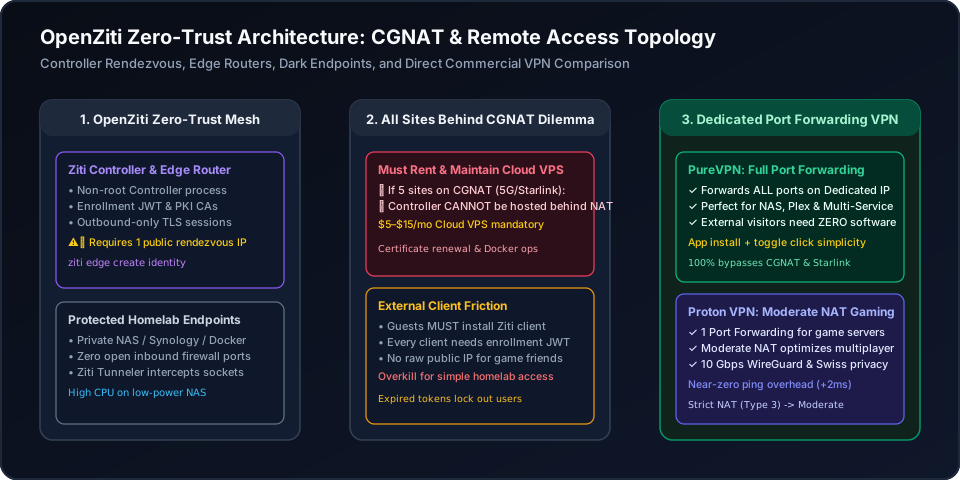
OpenZiti is an open-source, programmable Zero-Trust overlay networking platform that secures private services behind Carrier-Grade NAT (CGNAT) using application-embedded dark endpoints and outbound-only TLS connections. While OpenZiti eliminates traditional inbound router port forwarding, it faces a major architectural hurdle when all homelab sites sit behind CGNAT (such as T-Mobile 5G or Starlink): at least one OpenZiti Edge Router or Controller must reside on a publicly routable IP or cloud VPS to coordinate mesh rendezvous. In addition, external visitors and gaming friends cannot connect unless they install client software and enroll with JWT tokens. For users seeking effortless remote homelab access or multiplayer gaming without managing cloud servers or complex PKI certificates, a commercial VPN with native port forwarding—such as PureVPN for full multi-port forwarding or Proton VPN with Moderate NAT optimization—is remarkably simple, functioning just like installing an app and clicking a feature toggle switch.
Understanding OpenZiti: Dark Endpoints, Controllers & CGNAT Traversal
OpenZiti is an open-source, programmable zero-trust networking overlay that enables private remote access to home servers, Docker containers, and NAS systems without opening inbound firewall ports or possessing a static public IPv4 address.
Unlike legacy VPNs that connect entire networks together at Layer 3, OpenZiti operates on a strict dark endpoint philosophy: target servers listen exclusively on outbound mutual TLS (mTLS) channels to an OpenZiti Controller and Edge Router. Because the host opens zero public listening ports, port scanners, automated botnets, and malicious probing are blocked entirely.
Interactive OpenZiti NAT Traversal & Deployment Analyzer
Select your homelab workload, upstream internet type, and connection method to audit latency and rendezvous complexity:
Because your upstream ISP (T-Mobile 5G, Starlink, or rural fiber) assigns a shared 100.64.0.0/10 CGNAT address, inbound connection attempts are dropped at the carrier firewall. You cannot host the OpenZiti Controller or public Edge Router solely on your local homelab. You MUST rent and maintain a cloud VPS ($5–$15/month) with a static public IP to act as the rendezvous bridge.
OpenZiti Example Deployment: Docker, Non-Root Controller & Tokens
Deploying OpenZiti for personal or staging environments requires setting up the Controller, public Edge Router, administrative credentials, and edge tunneling daemons. Use the interactive configuration tabs below to copy verified production commands:
# Production OpenZiti Controller & Edge Router Deployment
# Recommended for public cloud VPS or static IP hosts
version: '3.8'

services:
  ziti-controller:
    image: openziti/ziti-controller:latest
    container_name: ziti-controller
    restart: unless-stopped
    user: "1000:1000" # Run openziti controller as non root
    environment:
      - ZITI_CTRL_ADVERTISED_ADDRESS=ziti.yourdomain.com
      - ZITI_CTRL_ADVERTISED_PORT=8440
      - ZITI_CTRL_EDGE_ADVERTISED_PORT=8441
    volumes:
      - ./ziti-data:/openziti
    ports:
      - "8440:8440" # Fabric control plane
      - "8441:8441" # Edge client API

  ziti-edge-router:
    image: openziti/ziti-edge-router:latest
    container_name: ziti-edge-router
    restart: unless-stopped
    user: "1000:1000" # Run non root for security
    depends_on:
      - ziti-controller
    environment:
      - ZITI_ROUTER_NAME=cloud-edge-router
      - ZITI_ROUTER_ADVERTISED_HOST=ziti.yourdomain.com
      - ZITI_ROUTER_PORT=8442
    volumes:
      - ./ziti-data:/openziti
    ports:
- "8442:8442" # Public Edge listener for CGNAT clientsThe OpenZiti CGNAT Dilemma: Does It Always Require a Cloud VPS?
Homelab self-hosters and remote networking enthusiasts across Reddit frequently ask a fundamental architectural question when planning their private network deployments:
"If all sites are behind CGNAT w/o a static public IP does openziti itself need to reside on a cloud/vps?"
The Community Frustration: A user with five distributed remote branches—all operating on T-Mobile 5G cellular home internet with dynamic CGNAT 100.64.0.0/10 addresses and no static public IPs—attempted to deploy OpenZiti to avoid paid commercial networking tools.
The Architectural Reality: Yes, OpenZiti itself must have at least one publicly routable rendezvous component (either an Edge Router or Controller). When both communicating endpoints are trapped behind carrier-grade NAT firewalls, outbound TLS handshakes cannot find each other. You must rent and maintain a cloud VPS (Vultr, Hetzner, AWS) to host the public Edge Router, creating an ongoing monthly server bill and certificate maintenance overhead.
"Port forwarding not working because of CGNAT for home exit IP"
The User Dilemma: A traveler wanting to access home files and stream local media found that router port forwarding failed because their ISP placed their router in a shared NAT pool. The ISP refused to allocate a static IP without upgrading to an expensive enterprise business plan.
The Solution Trade-Off: While OpenZiti can tunnel out of CGNAT, external friends or mobile devices cannot access Plex or game lobbies without installing the OpenZiti client and enrolling via cryptographic tokens. For seamless sharing, direct port forwarding over a VPN is vastly simpler.
OpenZiti vs Tailscale vs WireGuard vs Dedicated Port Forwarding VPNs
How does OpenZiti compare to popular mesh alternatives like Tailscale, native WireGuard, and commercial port forwarding VPNs?
| Evaluation Metric | OpenZiti (NetFoundry) | Tailscale (WireGuard) | PureVPN / Proton VPN |
|---|---|---|---|
| Primary Networking Model | Application-layer Zero-Trust (Dark Endpoints & mTLS) | Network-layer (L3) WireGuard mesh overlay | Dedicated gateway with direct port forwarding |
| CGNAT Rendezvous When All Sites are Behind NAT | Requires renting 1 public Cloud VPS ($5–$15/mo) | Routes through shared public DERP relays (+120ms ping) | Native bypass: unmetered public IP with zero VPS setup |
| External Visitor & Friend Joining Friction | Extreme: must install Ziti client & import JWT token | Very High: all devices must register to mesh | Zero: friends connect directly via IP:Port or DNS |
| Cryptographic CPU Overhead on Low-Power NAS | Heavy (Application-layer mTLS session negotiation) | Moderate (Go userspace on non-Linux, kernel on Linux) | Lowest (Kernel WireGuard with hardware acceleration) |
| Port Forwarding Flexibility | Intercepts internal sockets, no raw public port | Tailscale Funnel (limited ports & throughput) | PureVPN: paid forwarding add-on; Proton: 1 assigned port or Moderate NAT |
| Maintenance & Deployment Complexity | High (PKI CA certificates, Edge Routers, policies) | Low (Managed cloud coordinator or Headscale) | Zero (Install app and click feature toggle switch) |
The Effortless Alternative: Commercial Port Forwarding VPNs
While OpenZiti is an exceptional framework for enterprise zero-trust architectures and devops microservices, using it for personal homelab access or multiplayer gaming forces you to become a full-time network administrator—renting cloud VPS instances, maintaining PKI certificate authorities, and reissuing expired JWT tokens.
By contrast, a commercial VPN solution is remarkably simple—working just like installing an app and clicking a feature toggle switch. There is no need to write Docker compose files, rent cloud VPS servers, or force your friends to install special tunneling clients.
You get an unmetered, dedicated public endpoint that bypasses CGNAT instantly with native gaming speeds.
PureVPN
- Full Multi-Port Forwarding: Forward all required ports simultaneously for Synology NAS, Nextcloud, Plex, and Docker services.
- Dedicated Public IP: Gives your server a clean, static public IPv4 address that bypasses Starlink and 5G cellular CGNAT completely.
- Zero Client Friction for Guests: Friends and web visitors connect directly using your IP or custom domain without installing any apps.
- App + Toggle Simplicity: No need to maintain PKI CAs, renew Docker certificates, or troubleshoot expired JWT enrollment tokens.
- Gigabit Bandwidth: Unthrottled 20 Gbps server infrastructure engineered for continuous 4K media streaming and large backups.
5-year plan·$1.69/mo $12.95/mo
Proton VPN
- Moderate NAT Optimization: Helps compatible P2P matchmaking using more consistent mappings on paid plans. Use port forwarding instead for public hosting; these modes are used separately.
- Native 1-Port Forwarding: 1-click desktop toggle to forward TCP 25565 or UDP game ports cleanly through CGNAT.
- Lowest Ping Overhead: Eliminates the 100ms+ relay ping spikes of public overlay nodes with direct 10 Gbps WireGuard routing.
- Swiss Privacy Protection: Strictly audited zero-logs infrastructure legally protected outside EU/US surveillance alliances.
- 100% Open-Source Apps: Independently audited desktop and mobile clients with built-in kill switch and NetShield malware blocker.
2-year plan
This page contains affiliate links. If you sign up through them, NAT Checker may earn a commission at no extra cost to you.
How to Deploy OpenZiti or Upgrade to Dedicated Port Forwarding
1. Deploy OpenZiti Controller & Edge Router in Docker
Create a docker-compose.yml file configuring openziti/ziti-controller and openziti/ziti-edge-router. Configure external edge port 8441 and run under a dedicated non-root user account for container security.
2. Initialize PKI and Authenticate via CLI or Admin Console
Execute "ziti edge login" with your controller address and administrator credentials. Alternatively, access the OpenZiti Admin Console (ZAC) web UI to verify root certificate authorities and edge listener statuses.
3. Create Identity and Generate Client Enrollment Token
Run "ziti edge create identity user homelab-client -o homelab.jwt" to output a signed JSON Web Token. Send the token to your remote laptop or smartphone to bind the cryptographic identity.
4. Configure Service Intercepts, Dial Policies & App Routing
Bind your local NAS, Docker container, or game server using "ziti edge create service" and define Bind and Dial service policies to authorize client devices across the dark overlay.
5. Upgrade to a Dedicated Port Forwarding VPN for Frictionless Access
For public game or media hosting without visitor VPN software, use PureVPN’s paid forwarding add-on for selected ports on eligible locations, or Proton VPN paid P2P forwarding for one configurable listener. Match the service and firewall to the actual forwarded port; use Moderate NAT separately for compatible P2P matchmaking.
OpenZiti, CGNAT & Remote Access FAQ
What is OpenZiti and how does it work for remote access?↓
OpenZiti is a zero-trust network overlay developed under the Apache 2.0 license by NetFoundry. It replaces traditional VPNs and perimeter firewalls by embedding zero-trust principles directly into network sockets and applications. Through its Controller, Edge Routers, and client tunnelers, OpenZiti creates dark endpoints that accept no inbound internet packets, establishing outbound-only mutual TLS (mTLS) tunnels to route private homelab traffic seamlessly past CGNAT.
Is OpenZiti free and open source?↓
Yes, OpenZiti is 100% free and open-source software available on GitHub. You can download and self-host all components—including the Ziti Controller, Edge Router, and Web Admin Console (ZAC)—without paying software licensing fees. However, if your homelab sites lack a public static IP, you must pay hosting costs for a cloud VPS (typically $5–$15 per month) to host the public rendezvous router.
If all my sites are behind CGNAT, does OpenZiti need to reside on a cloud VPS?↓
Yes. When all connected sites (such as home broadband, cellular 5G, and mobile devices) sit behind Carrier-Grade NAT without a static public IP, OpenZiti requires at least one public Edge Router or Controller deployed on a cloud VPS (like Vultr, AWS, or Hetzner). Because dynamic CGNAT blocks inbound connection handshakes from both sides, the cloud-hosted node serves as the rendezvous point for outbound-only tunnels to meet.
OpenZiti vs Tailscale: what are the key differences?↓
Tailscale operates as a network-layer (Layer 3) WireGuard mesh connecting whole machines and subnets, whereas OpenZiti functions as an application-layer (Layer 4/7) programmable overlay with dark endpoints and granular service-level authorization. Tailscale relies on proprietary coordination servers (or community Headscale) with DERP relays, while OpenZiti is fully open source but requires self-hosting PKI certificates, Edge Routers, and policies.
How do you run OpenZiti Controller as non-root for security?↓
In production environments and official Docker images (openziti/ziti-controller), create a dedicated service account (e.g., uid 1000:1000 ziti) and set ownership of configuration and PKI state directories (/openziti). Avoid running container runtimes as root by adding "user: 1000:1000" in your docker-compose.yml file and granting the binary necessary capabilities (setcap cap_net_bind_service=+ep) if binding to privileged ports.
How do you create an enrollment token in OpenZiti for new devices?↓
Authenticate to your Ziti Controller using the CLI command "ziti edge login", then generate an identity with an enrollment token by executing "ziti edge create identity device <identity-name> -o <identity-name>.jwt". Distribute this .jwt token file to the target client device and import it into the OpenZiti Desktop Edge or Mobile Tunneler app before the token expiration window (default 1440 minutes).
Why choose a dedicated port-forwarding VPN over OpenZiti for homelabs?↓
While OpenZiti is powerful for enterprise devops and zero-trust policies, a commercial port-forwarding VPN (like PureVPN or Proton VPN) is drastically simpler for personal homelabs and gaming. You avoid paying for cloud VPS nodes, managing PKI certificates, and renewing expired tokens. A commercial VPN works just like installing an app and clicking a toggle switch, providing a clean public IP so friends and external web clients can connect without installing any special software.
Authoritative References & Internal Guides
Official Standards & Documentation
- OpenZiti Official Documentation & Architecture Guide
Official technical specifications for Controller, Edge Routers, Ziti Fabric, and SDK integrations.
- OpenZiti Open-Source GitHub Repository
Public code repository for the OpenZiti overlay network, Edge CLI, and container images.
- RFC 6598: Carrier-Grade NAT (CGNAT) 100.64.0.0/10 Prefix
IANA technical standard defining carrier address pooling that blocks incoming homelab connections.
- Securitum Independent Security Audit for Proton VPN
Independent technical audit verifying WireGuard architecture and strict zero-logs server operations.
Related Connectivity & Port Guides
- How to Port Forward Behind CGNAT Without Static IP
Bypass carrier IP sharing to host game servers and remote homelab apps.
- How to Check if Your Router is Behind CGNAT
Diagnose 100.64.0.0/10 WAN addresses on Starlink and 5G cellular broadband.
- VPN with Static IP and Port Forwarding Guide
Compare dedicated IP solutions that deliver permanent public endpoints.
- zrok Port Sharing & Minecraft Tunneling Guide
Explore OpenZiti-based zrok tunneling and public ephemeral endpoints.