OpenWrt Port Forwarding Guide: LuCI & UCI Rules (2026)
Complete OpenWrt port forwarding guide for LuCI and UCI. Resolve closed port errors, configure Minecraft and SSH remapping, and bypass CGNAT.
Quick Answer: How to Port Forward in OpenWrt
To set up openwrt port forwarding in LuCI, log into your router (http://192.168.1.1), navigate to Network > Firewall > Port Forwards, and click Add. Set Source zone to "wan", Protocol to TCP or UDP, External port to your service port (e.g., 25565 for Minecraft, 2222 for SSH), Destination zone to "lan", and Internal IP address to your target server with its Internal port. Click Save & Apply. Alternatively, use openwrt port forwarding uci in CLI: "uci add firewall redirect", set target properties, and run "uci commit firewall && /etc/init.d/firewall restart". If your openwrt port forwarding done but on online port checker is closed, your ISP is likely enforcing Carrier-Grade NAT (RFC 6598 100.64.0.0/10) or your target device firewall is blocking external subnets, requiring an inbound VPN tunnel like Proton VPN or PureVPN’s paid forwarding add-on on an eligible connection to bypass.
Configuring openwrt port forwarding gives you granular control over Linux nftables and packet flows. However, few networking hurdles are more aggravating than adding rules in LuCI or UCI, clicking Save & Apply, and watching an external port checker return an immediate "Port is CLOSED" error.
Whether you are executing an openwrt add port forwarding for ssh command, hosting an openwrt port forwarding minecraft server, or routing WireGuard tunnels, this guide provides tested UCI CLI scripts, step-by-step LuCI procedures, and permanent solutions to bypass ISP CGNAT.
Interactive OpenWrt Port Forward Rule Generator
Select your service preset and target host to generate copy-paste ready UCI commands or LuCI configuration steps.
Standard TCP port for multiplayer Minecraft server hosting.
Must be bound via Static DHCP Lease.
Fixes LAN-to-LAN connections using your WAN IP.
# 1. Create firewall redirect rule in OpenWrt UCI
uci add firewall redirect
uci set firewall.@redirect[-1].name='PortForward_minecraft'
uci set firewall.@redirect[-1].src='wan'
uci set firewall.@redirect[-1].proto='tcp'
uci set firewall.@redirect[-1].src_dport='25565'
uci set firewall.@redirect[-1].dest='lan'
uci set firewall.@redirect[-1].dest_ip='192.168.1.150'
uci set firewall.@redirect[-1].dest_port='25565'
uci set firewall.@redirect[-1].target='DNAT'
uci set firewall.@redirect[-1].reflection='1'

# 2. Commit changes and restart the OpenWrt firewall
uci commit firewall
/etc/init.d/firewall restart
OpenWrt Firewall Architecture: Packet Translation & CGNAT Flow
Understanding how OpenWrt translates packets between the WAN and LAN zones clarifies why an external port checker reports closed when upstream ISP configurations or firewall filter rules drop SYN handshakes.
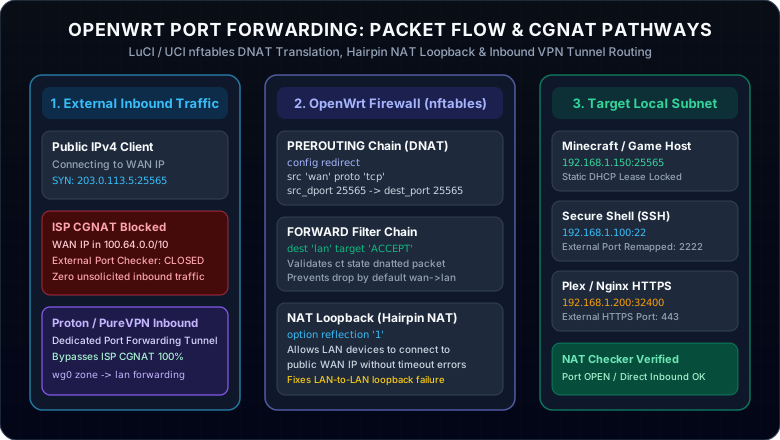
Why OpenWrt Port Forwarding Done but Online Port Checker is Closed
You verified the LuCI port forward table, confirmed the rule is enabled, and your server is running. Yet NAT Checker reports Connection timed out / Closed. These five underlying factors account for over 95% of all closed port occurrences.
Check your OpenWrt WAN interface IP under Network > Interfaces > WAN. If your IPv4 address falls within the 100.64.0.0/10 subnet (from 100.64.0.0 to 100.127.255.255), your ISP does not assign you a public IP. Your router is sitting behind an upstream carrier firewall that silences all unsolicited inbound packets, rendering local router port forwards completely inert.
When OpenWrt forwards an external packet, the source IP remains the remote public IP. Operating systems like Windows Defender Firewall or Linux ufw frequently drop incoming packets if the rule only permits traffic from the local subnet (192.168.1.0/24). Ensure your server host firewall rule explicitly allows the target port from Any / Public networks.
An online port checker requires an active listening socket to complete the TCP three-way handshake. If your application or server is stopped, or bound exclusively to loopback 127.0.0.1, the host OS sends an immediate TCP RST (Reset). In Minecraft, verify server.properties has server-ip= left blank to listen across all interfaces.
Attempting to join your server from inside your home network using your external WAN IP or DDNS hostname (such as DuckDNS or Dynu DDNS) will hang or timeout unless NAT Loopback (Hairpin NAT) is enabled. In OpenWrt LuCI, open the port forward rule, select Advanced Settings, and ensure NAT loopback is active.
Reddit Case Studies: OpenWrt Behind CGNAT & WireGuard Port Forwarding
Real network homelab scenarios discussed across r/openwrt and r/selfhosted illustrate common stumbling blocks:
As reported on Reddit, users running OpenWrt on a Raspberry Pi router behind mobile 5G or Starlink find that Xbox NAT displays "Strict" and UPnP fails. Because mobile carriers enforce symmetric CGNAT, port forward rules in LuCI cannot open ports. Users resolved this by routing gaming traffic through a WireGuard tunnel with native port forwarding, restoring "Open NAT".
When running PiVPN on an internal Pi-hole server, users added UDP port 51820 redirects in LuCI, but external handshake packets never arrived. The cause was upstream Double NAT from an ISP fiber modem. Putting the ISP modem into True Bridge Mode (or assigning OpenWrt to DMZ) restored packet flow instantly.
OpenWrt Port Forwarding IPv6: Why There is No DNAT in IPv6
A frequent source of confusion among new OpenWrt administrators is searching for "openwrt port forwarding ipv6" in the Port Forwards tab. IPv6 architecture eliminates Network Address Translation entirely because every client device in your home receives a globally unique, publicly routable IPv6 address (typically via a /64 prefix from your ISP).
Rather than creating a DNAT Port Forward, navigate to Network > Firewall > Traffic Rules and add a new rule:
- Source zone: wan
- Destination zone: lan
- Destination address: Target Client IPv6 Suffix / Interface ID
- Destination port: Your Service Port (e.g., 25565)
- Action: ACCEPT
Crucial Limitation: While IPv6 traffic passes directly to your server, friends or clients connecting from IPv4-only networks (such as most 4G mobile data connections, hotel networks, or older ISPs) cannot reach an IPv6-only host. Universal reachability still requires a dedicated IPv4 port forwarding pathway (see our full guide on does IPv6 need port forwarding?).
Bypass OpenWrt CGNAT Restrictions with High-Performance Port Forwarding VPNs
If your ISP enforces Carrier-Grade NAT, no amount of router tweaking in LuCI or UCI can open incoming ports. Rather than paying your ISP expensive monthly fees for a commercial static IP, deploying a dedicated VPN with native port forwarding creates an encrypted tunnel that routes incoming connections straight to your OpenWrt router or server.
Proton VPN
- Native WireGuard client integration directly on OpenWrt routers
- Paid P2P forwarding via NAT-PMP requests and renewals on the OpenWrt router
- Strict Swiss no-logs jurisdiction with audited open-source apps
- 30-day money-back guarantee with zero risk
PureVPN
- Paid Dedicated IP plus Port Forwarding add-ons for a stable exit and selected port policy
- Eliminates dynamic DDNS sync scripts and 24-hour IP dropouts
- 100% bypass for Starlink, 5G, and mobile ISP CGNAT barriers
- 31-day hassle-free refund window
This page contains affiliate links. If you sign up through them, NAT Checker may earn a commission at no extra cost to you.
Proton VPN WireGuard on OpenWrt: The 3-Minute Blueprint
With Proton VPN Plus, you can configure a lightweight WireGuard interface directly on OpenWrt (luci-proto-wireguard). Generate a paid P2P profile with NAT-PMP enabled, then bind the WireGuard interface to a new firewall zone (vpn_client). Run a NAT-PMP client such as natpmpc to request and renew the assigned port. Add a port-forward rule from vpn_client to the target LAN IP and listening port, and keep the return route through the VPN. Remote users connect to the VPN exit IP and active assigned port.
Related Networking & Firewall Troubleshooting Guides
Deepen your network knowledge and verify connectivity across all major router brands and services: