Nextcloud Port Forwarding: TCP/UDP, AIO & CGNAT Fix
Configure Nextcloud port forwarding for web and Talk. Learn exact TCP/UDP ports, set up Fritz!box and Docker AIO, fix closed ports, and bypass ISP CGNAT.
Quick Answer: What Ports Does Nextcloud Need for External Access?
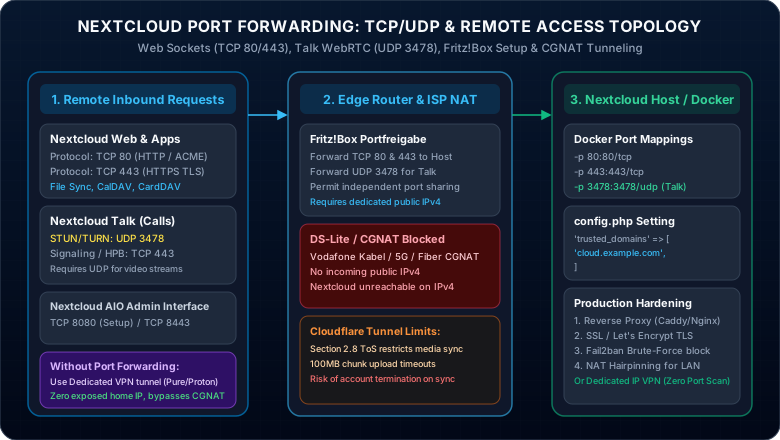
For standard Nextcloud web and file sync, forward TCP 80 (HTTP/ACME certificate renewal) and TCP 443 (HTTPS TLS encryption) on your router to your host machine IP. If you use Nextcloud Talk for audio/video calling, also forward UDP 3478 (STUN/TURN WebRTC media stream). For Nextcloud AIO (All-in-One), ensure TCP 8080 (initial setup) or TCP 8443 is accessible, and add your public domain to trusted_domains in config.php. If your ISP uses CGNAT or DS-Lite, traditional router port forwarding will fail—bypass it with a port-forwarding VPN or dedicated WireGuard tunnel.
Nextcloud Port Forwarding: The Ultimate TCP/UDP & Remote Access Guide
You deployed Nextcloud or Nextcloud AIO on your home server to reclaim your digital sovereignty from Google Drive and OneDrive. Everything syncs flawlessly inside your living room—but the moment you step outside and disconnect from your home Wi-Fi, the Nextcloud mobile app displays a frustrating "Server Not Found" error.
Configuring nextcloud port forwarding should be straightforward, yet self-hosters routinely encounter painful hurdles. Does Nextcloud need TCP or UDP? Why does Nextcloud Talk fail to connect video calls? How do you map ports inside Docker without exposing raw HTTP? And what happens when your router is a FRITZ!Box or your European/US internet provider places you behind CGNAT or DS-Lite, rendering standard port forwarding completely impossible?
This guide cuts through the confusion. Discover exact TCP/UDP port requirements, master nextcloud aio port forwarding, configure nextcloud port forwarding fritzbox rules, and explore how to access your nextcloud without port forwarding when carrier firewalls block incoming connections.
Interactive Triage: What Is Your Nextcloud Setup?
Select your architecture to jump straight to the exact configuration:
Nextcloud Port Forwarding TCP UDP: What Port Does Nextcloud Run On?
One of the top questions self-hosters search is: Does Nextcloud use TCP or UDP? The answer depends on which Nextcloud services you expose:
| Service Component | Port Number | Protocol | Purpose & Description | Router Forwarding Required? |
|---|---|---|---|---|
| Web Access (HTTP) | 80 | TCP | Let's Encrypt ACME challenge / HTTP-to-HTTPS redirect | Yes (Recommended) |
| Web Access (HTTPS TLS) | 443 | TCP | Primary encrypted web UI, WebDAV sync, mobile app API | Yes (Mandatory) |
| Nextcloud AIO Master | 8080 / 8443 | TCP | AIO setup dashboard and container orchestration | LAN only (Initial setup) |
| Nextcloud Talk (WebRTC) | 3478 | UDP | STUN / TURN audio and video streaming packets | Yes (For Talk calls) |
| Collabora / OnlyOffice | 9980 | TCP | Office document editing backend (often proxied over 443) | Internal / Reverse Proxy |
Nextcloud AIO Port Forwarding & Docker Setup
When deploying via Docker or Nextcloud All-in-One (AIO), port forwarding occurs in two distinct tiers: Router Port Forwarding (delivering traffic from the internet to your host server IP) and Docker Port Mapping (binding host ports to container sockets).
Docker Compose Port Forwarding Configuration
Ensure your Docker container maps host port 80 and 443. If using a reverse proxy (Caddy, Nginx Proxy Manager, or Traefik), bind Nextcloud internally and forward 80/443 directly to the proxy container. For deep syntax rules, see our Docker Port Forwarding Guide.
services:
  nextcloud:
    image: nextcloud:latest
    container_name: nextcloud-server
    restart: unless-stopped
    ports:
      - "80:80"       # Web (HTTP) - TCP
      - "443:443"     # Web (HTTPS TLS) - TCP
    environment:
      - OVERWRITEPROTOCOL=https
    volumes:
      - nextcloud_data:/var/www/html
volumes:
  nextcloud_data:
Fixing "Access through untrusted domain" Error
Even with correct router port forwarding, Nextcloud rejects external requests unless your public domain is explicitly declared in config/config.php. Add your DDNS hostname or custom domain:
'trusted_domains' =>
array (
  0 => '192.168.1.100',
  1 => 'cloud.yourdomain.com',
  2 => '203.0.113.50',
),
'overwrite.cli.url' => 'https://cloud.yourdomain.com',
'overwriteprotocol' => 'https',Nextcloud Port Forwarding on FRITZ!Box (Portfreigabe)
For European and German self-hosters, nextcloud port forwarding fritzbox is the standard router procedure. Follow these exact steps inside FRITZ!OS:
Step 1: Access the FRITZ!Box Dashboard
Open your browser and navigate to http://fritz.box (or 192.168.178.1). Enter your FRITZ!Box administrator password.
Step 2: Add Device for Port Sharing (Gerät für Freigabe hinzufügen)
Go to Internet → Permit Access (Freigaben) → Port Sharing (Portfreigaben). Click Add Device for Sharing (Gerät für Freigabe hinzufügen). Select your Nextcloud server from the device dropdown list and verify that "Always assign this network device the same IPv4 address" is checked.
Step 3: Create HTTP & HTTPS Port Sharings
Scroll down to Port Sharings (Portfreigaben) and click New Sharing (Neue Freigabe):
- Rule 1 (HTTPS): Application: HTTPS-Server | Protocol: TCP | Port to device:
443| Port shared externally:443. - Rule 2 (HTTP): Application: HTTP-Server | Protocol: TCP | Port to device:
80| Port shared externally:80. - Rule 3 (Talk): Application: Custom (Andere Anwendung) | Protocol: UDP | Port to device:
3478| Port shared externally:3478.
Step 4: Enable Independent Port Sharing (Selbstständige Portfreigaben)
If using Nextcloud Talk with dynamic UPnP/PCP negotiation, check "Permit independent port sharing for this device". Click Apply (Übernehmen) to save. For additional FRITZ!OS troubleshooting, refer to our FRITZ!Box Port Forwarding Guide.
Nextcloud Without Port Forwarding: Why Direct Port Exposure is Dangerous
Thousands of developers search: does nextcloud need port forwarding, or is it better to access nextcloud without port forwarding?
Opening WAN port 80 and 443 directly on your home router points the entire public internet directly into your home LAN. Search engines like Shodan and automated vulnerability scanners probe residential IP addresses 24 hours a day. If your Nextcloud instance or an unpatched plugin contains a Zero-Day vulnerability, attackers can compromise your server, encrypt your hard drives, or access your confidential family files.
Comparing Nextcloud Remote Access Architectures
Comparison of external connectivity methods based on file transfer speed, privacy, CGNAT bypass, and security:
| Access Architecture | Bypasses CGNAT? | File Sync Speed | Cloudflare ToS Compliant? | Hides Home IP? |
|---|---|---|---|---|
| Direct Router Port Forwarding | No (Fails on CGNAT) | Full Line Speed | N/A (Direct) | No (Exposed to DDoS) |
| Cloudflare Tunnels (cloudflared) | Yes | Throttled on 100MB+ | No (Violates Section 2.8) | Yes |
| Tailscale / WireGuard Mesh | Yes | High Speed | Yes | Yes (Requires Client App) |
| Port-Forwarding Dedicated VPN | Yes (100% Bypass) | Unmetered 10 Gbps | Yes (Zero Limits) | Yes (Total Anonymity) |
Trapped Behind CGNAT or DS-Lite? Access Nextcloud Anywhere with a VPN
Does your ISP use Carrier-Grade NAT (CGNAT) or Dual-Stack Lite (DS-Lite)?
If you are on Vodafone Kabel, Deutsche Telekom, Starlink, or T-Mobile 5G Home Internet, your router does not possess a public IPv4 address. Your WAN IP resides in the shared 100.64.0.0/10 range (RFC 6598). No router port forwarding rule will ever reach your Nextcloud server.
Furthermore, asking your family or non-technical friends to install WireGuard profiles on all their iPhones and laptops just to view a shared photo album is completely impractical.
How a Port-Forwarding Dedicated VPN Unlocks Seamless Nextcloud Access
When you connect your Nextcloud server host to a VPN that supports Inbound Port Forwarding and a Dedicated Public IP, an encrypted outbound tunnel connects straight to a Tier-1 datacenter. That datacenter assigns you a permanent, static public IP address. You can point your domain (e.g. cloud.yourdomain.com) directly to that IP—allowing anyone to access Nextcloud without client software, bypassing CGNAT and completely shielding your home residential IP address from internet scans!
This page contains affiliate links. If you sign up through them, NAT Checker may earn a commission at no extra cost to you.
PureVPN + Dedicated IP & Port Forwarding
The premier VPN solution for self-hosting Nextcloud behind CGNAT, Starlink, and DS-Lite. Provides an unshared static IP that points cleanly to your own personal domain name.
- Fixed Dedicated IP: Point your DNS A-record (e.g.
cloud.yourdomain.com) straight to your private PureVPN IP. No Dynamic DNS updater required! - Custom Inbound Port Forwarding: Reserve and bind exact TCP/UDP ports (including HTTP/HTTPS and Nextcloud Talk STUN 3478) directly in your member dashboard.
- Client-Free Family Access: Your family members and colleagues connect via standard web browsers and official Nextcloud iOS/Android apps—no VPN profile required on their devices.
- No File Transfer Limits: Sync multi-gigabyte video libraries, photo backups, and database archives without Cloudflare 100MB chunk drops.
31-day money-back guarantee • 24/7 technical live chat assistance
Proton VPN (Paid Plus)
Swiss-engineered VPN providing WireGuard speeds up to 10 Gbps, dynamic NAT-PMP port forwarding, and audited zero-logs privacy for home lab administrators.
- Dynamic Inbound Port Forwarding: Built-in NAT-PMP support easily scripted via
natpmpcinside Linux or Docker for automated port maintenance. - 10 Gbps WireGuard Infrastructure: Blazing-fast sync speeds for 4K video streams and large raw photo galleries without packet throttling.
- Swiss Privacy Protection: Headquartered in Geneva, Switzerland, under strict Swiss privacy laws with zero logging and fully open-source code.
- Complete DDoS Protection: Shield your home network from volumetric floods by terminating incoming traffic in Swiss datacenters.
Risk-free 30-day refund policy • Servers in 110+ countries
Want to explore more NAS remote access strategies? Check out our guides for Synology NAS Remote Access and ASUSTOR Remote Access & DeadBolt Security.
Frequently Asked Questions: Nextcloud Port Forwarding
Does Nextcloud use TCP or UDP?
What port does Nextcloud run on?
How do I change the port on Nextcloud?
docker-compose.yml (e.g. change "80:80" to "8080:80"). On bare-metal Apache installations, edit /etc/apache2/ports.conf and your virtual host file in /etc/apache2/sites-available/ to change Listen 80 to your desired port number, then restart Apache.How can I access my Nextcloud server remotely?
Does Nextcloud need port forwarding?
How to access Nextcloud without port forwarding?
What ports does Nextcloud AIO need for port forwarding?
How to set up Nextcloud port forwarding on a Fritz!box?
http://fritz.box, navigate to Internet → Permit Access (Freigaben) → Port Sharing (Portfreigaben), click Add Device for Sharing, select your Nextcloud server, add rules for HTTP (TCP 80), HTTPS (TCP 443), and Talk (UDP 3478), and click Apply. If your internet provider uses DS-Lite, you will need a dual-stack public IPv4 or a port-forwarding VPN to enable remote IPv4 connections.