ASUSTOR Remote Access: Secure Setup, EZConnect & VPN Guide
Ultimate ASUSTOR remote access guide. Troubleshoot EZConnect, fix mobile app disconnects, protect against DeadBolt ransomware, and bypass CGNAT with VPN.
Quick Answer: How to Setup ASUSTOR Remote Access
To configure asustor remote access, open ADM > Settings > EZConnect, toggle "Enable EZConnect Service", and register your unique Cloud ID for basic remote login. However, if your asustor remote access is throttled, drops during file streaming, or mobile apps (AiData, AiMaster, AiFoto) show connection failed outside your home network, your connection is bottlenecked by overseas relay servers or blocked by carrier CGNAT. Warning: never expose default ADM ports (8000/8001) directly to your home router WAN due to active DeadBolt ransomware campaigns. For full-speed, secure remote access behind CGNAT without port forwarding vulnerabilities, use PureVPN’s paid Dedicated IP and forwarding add-ons with an ADM OpenVPN profile, or a compatible Proton VPN gateway with paid P2P forwarding and NAT-PMP renewal.
Tested across ASUSTOR AS5402T, AS6702T Lockerstor Gen2, and Drivestor 2 on gigabit fiber and CGNAT connections.
Investing in an ASUSTOR NAS—whether an agile AS5402T, a robust Lockerstor, or a capable Drivestor—is meant to deliver your ultimate private cloud. You expect uninhibited 2.5GbE file synchronizations, seamless 4K video playback on the go, and absolute sovereignty over your family photo albums. However, the moment you step outside your home Wi-Fi, asustor remote access frequently turns into an uphill battle.
Official EZConnect relays throttle speeds down to an agonizing 1-2 MB/s with frequent 502 Bad Gateway timeouts. Meanwhile, directly opening your router ports (8000/8001) exposes your hard drives to automated botnets and malicious exploits—most notoriously the DeadBolt ransomware outbreak that encrypted thousands of exposed ASUSTOR appliances worldwide. Add in modern broadband restrictions like Carrier-Grade NAT (CGNAT), and mobile apps like AiData and AiMaster fail to connect entirely. This guide presents the secure, high-speed engineering blueprint to access your ASUSTOR NAS from anywhere without compromising your data.
ASUSTOR Remote Access Methods: Speed, Security & Trade-offs
Evaluate how the four primary ASUSTOR connectivity pathways perform under real-world internet conditions.
| Access Pathway | Bandwidth & Speed | CGNAT Compatible? | Ransomware Defense | Mobile App Support |
|---|---|---|---|---|
| EZConnect Cloud Relayasustor.link relay | 1 - 2 MB/s (Throttled) | Yes (Relayed) | Moderate | Native AiData (Slow) |
| DDNS + Port Forwardingmyasustor.com + 8001 | Line Speed (Max) | No (Fails on CGNAT) | Severe Risk (DeadBolt) | Full Support |
| Tailscale / Mesh VPNDERP Relay / Overlay | Direct P2P Speed | Yes (P2P NAT punch) | Very High | Buggy (Offline in Apps) |
| Dedicated IP VPN TunnelPureVPN / Proton VPN | Gigabit Line Speed | 100% Bypass | Military Grade | 100% Full Support |
ASUSTOR Remote Ingress Architecture & Attack Surface
Compare the security posture of cloud relays, exposed router ports, and encrypted outbound VPN tunnels.
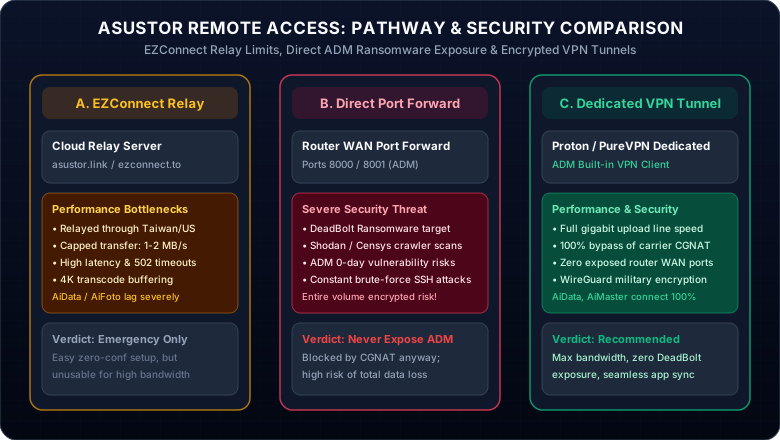
Figure 1.0: Security and throughput comparison between EZConnect cloud relay, raw router port forwarding, and authenticated VPN tunnels.
Security Imperative: Never Expose Raw ADM Ports (8000/8001) to Public WAN
Documented Ransomware Vector: DeadBolt & Automated Exploit Botnets
In February 2022, thousands of ASUSTOR NAS devices were locked and encrypted by the DeadBolt ransomware. Attackers leveraged an unauthenticated zero-day remote code execution vulnerability targeting ADM web interfaces directly exposed on default ports 8000 (HTTP) and 8001 (HTTPS).
Immediately alter 8000 and 8001 to a high random 5-digit number (e.g. 48392) in ADM Settings > General.
Create a unique administrator username with 2FA, then disable the built-in "admin" account completely.
Never forward ADM through your router firewall. Always tunnel traffic through an authenticated VPN.
Why ASUSTOR Mobile Apps (AiData / AiMaster) Disconnect Over VPN & How to Fix It
A frequent dilemma reported across the ASUSTOR Reddit community occurs when users install Tailscale or a generic VPN: the NAS shows "Connected" in the system tray, but opening AiData, AiMaster, or AiFoto 3 on iOS or Android results in endless spinning or "502 Bad Gateway / Device Offline".
ASUSTOR mobile apps rely on mDNS / Bonjour local broadcast to discover NAS hostnames automatically. Virtual mesh overlays do not route multicast broadcast packets across cellular subnets.
The Solution: In your mobile app (AiData / AiMaster), do NOT search for Cloud ID or device name. Instead, tap Manual Connect, enter your Dedicated VPN IP address (e.g. 198.51.100.25) in the Host field, enter your custom HTTPS port (e.g. 48393), and toggle "HTTPS Enabled". The app connects instantly without requiring cloud relay discovery.
ASUSTOR Remote Access & Port Exposure Calculator
Select your ASUSTOR hardware model, your ISP network reachability, and desired apps to calculate firewall safety scores and connection parameters.
Your carrier drops incoming WAN connections. Traditional DDNS port forwarding will not function. PureVPN’s paid Dedicated IP and Port Forwarding add-ons provide a stable public entry for selected NAS services. Proton uses an assigned port that needs NAT-PMP renewal. Keep the VPN route and the NAS service ports aligned.
Full-Speed ASUSTOR Remote Access via Dedicated VPN
Bypass carrier CGNAT and use your own forwarded VPN entry instead of the EZConnect relay.
Why a Dedicated IP VPN is the Gold Standard for ASUSTOR Owners
Running a VPN client directly inside ADM establishes an authenticated, high-throughput outbound tunnel. This delivers five key operational advantages:
- Gigabit Line Speed: Eliminates 1-2 MB/s EZConnect cloud bottleneck.
- Dedicated VPN Entry: Router WAN ports stay closed; publish only the NAS services you need at the VPN exit.
- Seamless Mobile Apps: AiData and AiMaster connect reliably via Dedicated IP.
- Universal CGNAT Bypass: Works over Starlink, 5G home broadband, and fiber.
PureVPN
- Dedicated IP provides a fixed, persistent public endpoint for your ASUSTOR NAS
- OpenVPN profiles work in ADM; enable paid forwarding and route the chosen ports to the NAS
- AiData, AiMaster, and AiFoto use the VPN exit address and their supported forwarded service ports
- 100% bypasses restrictive 5G mobile and Starlink CGNAT architectures
5-year plan·$1.69/mo $12.95/mo
Proton VPN
- High-performance WireGuard tunnel shields your NAS physical IP from scanners
- Dynamic NAT-PMP port forwarding enables seamless remote backups and Plex streaming
- Strict Swiss privacy jurisdiction with independent third-party no-logs audit
- 30-day risk-free money-back guarantee with priority 24/7 technical support
2-year plan
This page contains affiliate links. If you sign up through them, NAT Checker may earn a commission at no extra cost to you.
Quick Setup: How to Connect PureVPN or Proton VPN in ADM
- Log into ADM as administrator and open Settings > VPN.
- Click Add > OpenVPN (or WireGuard if using community kernel packages).
- Download a PF-supported OpenVPN profile from PureVPN with the forwarding add-on enabled and import it into ADM. For Proton VPN, use a paid P2P profile with NAT-PMP enabled and a gateway that can renew the assigned port.
- Check "Reconnect automatically when the VPN connection is lost" and click Finish.
- Open AiData on your smartphone, select Manual Connect, enter the VPN exit IP and forwarded service port, and connect. For Proton, update the service port when its assignment changes.
Frequently Asked Questions
Clear, authoritative answers addressing ASUSTOR remote login, EZConnect troubleshooting, and ransomware prevention.