Does IPv6 Need Port Forwarding? The Definitive Guide
Does IPv6 need port forwarding? No, because IPv6 eliminates NAT. But you still need firewall pinholing. Learn how it works and how to bypass CGNAT easily.
Quick Answer
No, IPv6 does not need port forwarding. In legacy IPv4, port forwarding is necessary because Network Address Translation (NAT) hides multiple private devices behind a single public IPv4 address. Under IPv6, every connected device is assigned its own globally unique public IP address (Global Unicast Address, or GUA), so address and port rewriting are unnecessary. However, your router’s stateful firewall blocks all unsolicited inbound traffic by default (RFC 6092). Therefore, you still need to open a firewall "pinhole" or permit incoming traffic to your device’s specific IPv6 address and listening port. More critically, IPv6 does not solve the dual-stack gap: any client on an IPv4-only network (such as mobile cellular connections or friends without IPv6) cannot connect to your IPv6 server. If your ISP traps you in IPv4 CGNAT and you need universal reachability, a port-forwarding VPN like Proton VPN or PureVPN provides a clean, painless solution—working as simply as installing an app and clicking a feature toggle.
Every IPv6 device gets a globally routable public address (GUA), eliminating the need for private-to-public port address translation.
All residential IPv6 routers block unsolicited incoming traffic by default. An inbound firewall pinhole must be explicitly opened.
Opening an IPv6 pinhole only works for IPv6-capable peers. Visitors on IPv4-only networks remain completely unable to connect.
IPv6 Inbound Reachability & Dual-Stack Feasibility Calculator
Many users open an IPv6 port only to find their friends still cannot connect. Select your server workload, router state, and your visitors' connection type to test if IPv6 direct access will succeed.
Dual-Stack Protocol Gap: The visitor’s network only has IPv4. IPv4 cannot route to IPv6.
Opening an IPv6 firewall port will NOT help this visitor. A VPN with port forwarding is required to give your server an IPv4 listening endpoint.
IPv4 NAT Port Forwarding vs. IPv6 Firewall Pinholing: The Architectural Shift
Understand the fundamental differences between how IPv4 rewrites packets and how IPv6 transparently routes traffic through your perimeter firewall:
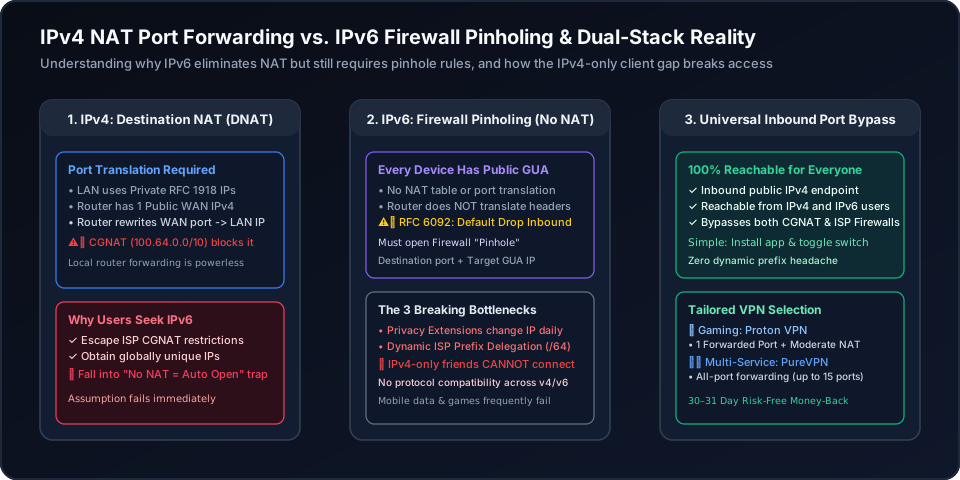
In IPv4, your entire local network shares one public address. When someone connects to 203.0.113.5:25565, your router intercepts the packet, inspects its NAT translation table, rewrites the destination IP to 192.168.1.100, and forwards it. If your ISP uses Carrier-Grade NAT (CGNAT, 100.64.0.0/10), this local forwarding fails completely.
In IPv6, your server has its own public Global Unicast Address (e.g. 2001:db8::100). The router does zero address translation. Packets arrive addressed directly to the server. The router’s only job is deciding whether to permit the packet through its stateful firewall filter. An "IPv6 port forward" is simply a firewall pass rule.
The 4 Critical Roadblocks That Break IPv6 Inbound Access
If IPv6 gives every device a public address, why do so many users struggle to make self-hosted games and servers reachable?
IPv4 and IPv6 are fundamentally incompatible protocols. An IPv4-only device cannot send a packet to a 128-bit IPv6 address. If your friends' ISP, hotel Wi-Fi, or mobile carrier does not support IPv6, they cannot connect to your IPv6 server, period. Unless all your visitors have native IPv6, your server remains isolated for a large portion of the internet.
Under RFC 4941, Windows, macOS, and Linux generate randomized "temporary" IPv6 addresses every 24 hours to prevent web tracking. If you write a router firewall rule pointing to your temporary IPv6 address, the rule will stop working tomorrowas soon as your OS generates a new temporary address!
Unlike enterprise datacenters with static IPv6 subnets, residential broadband providers assign dynamic IPv6 prefixes (typically a /64 or /56). Whenever your modem reconnects or your lease renews, your entire subnet prefix changes, invalidating static firewall rules and DNS records.
Windows Defender, Ubuntu UFW, and macOS Application Firewalls treat IPv6 and IPv4 traffic as separate policy sets. Allowing an inbound port on IPv4 does not automatically allow it on IPv6. Furthermore, many server daemons bind exclusively to0.0.0.0 instead of dual-stack ::.
Comparison: IPv4 Port Forwarding vs. IPv6 Pinhole vs. VPN Bypass
See how different connectivity strategies compare across compatibility, CGNAT resistance, and maintenance overhead:
| Criterion | IPv4 Port Forwarding | IPv6 Firewall Pinhole | VPN Port Forwarding (Recommended) |
|---|---|---|---|
| Address Translation (NAT) | Required (PAT/NAPT rewrites headers) | None: Direct end-to-end routing | None locally (Forwarded tunnel endpoint) |
| Firewall Policy Default | Closed (Untranslated packets drop) | Closed by default (RFC 6092 Stateful Drop) | Open on chosen VPN forwarded port |
| Client Compatibility | Universal (All devices support IPv4) | Limited (Fails for IPv4-only visitors) | Universal (Accepts any client worldwide) |
| Address Stability | Static LAN IP via DHCP reservation | Unstable: Temporary SLAAC changes daily | Static port assigned to your active tunnel |
| ISP CGNAT Impact | Blocks all inbound forwarding | Bypasses IPv4 CGNAT (if ISP has IPv6) | 100% bypasses CGNAT and strict NAT |
| Setup Complexity | Moderate: Router port forward rule | High: Static Token + Pinhole + DDNS | Very Simple: Install app & toggle switch |
Bypass IPv4 CGNAT & IPv6 Incompatibility: The Painless VPN Port Forward
Stuck behind ISP Carrier-Grade NAT on IPv4, and tired of friends failing to reach your IPv6 address? The VPN port-forwarding approach is remarkably simple—just like installing an app and clicking a feature toggle switch.
A port-forwarding VPN provides an external, globally routable IPv4 listening port directly to your machine. Because incoming traffic traverses the encrypted VPN tunnel, all visitors—whether they are on mobile 4G/5G, IPv4-only networks, or modern dual-stack broadband—can connect instantly. You avoid all dynamic prefix headaches, SLAAC privacy shifts, and locked router firewalls (concerned about dual-stack leaks when using a VPN? Read our in-depth VPN IPv6 security guide).
Proton VPN
- 1 dedicated forwarded port with zero router firewall modifications
- Exclusive Moderate NAT feature improves peer matchmaking in games like Minecraft & CoD
- Simple: install the application on your PC or server and click the feature switch
- 100M+ accounts, 5 independent security audits, and 30-day refund window
2-year plan
PureVPN
- All-port forwarding mode, or specific ports added up to 15 at a time in the member area
- Provides public IPv4 endpoint reachable by all IPv4-only and IPv6 clients worldwide
- Completely eliminates ISP Carrier-Grade NAT (CGNAT) and IPv6 prefix changes
- 3M+ users, ISO 27001 certified, and 31-day risk-free money-back guarantee
5-year plan·$1.69/mo $12.95/mo
This page contains affiliate links. If you sign up through them, NAT Checker may earn a commission at no extra cost to you.
How to Configure Inbound Access on IPv6 and Bypass Network Barriers
Comprehensive step-by-step instructions to verify IPv6 connectivity, open router firewall pinholes, handle dynamic prefix changes, and ensure IPv4 client compatibility.
Check your server’s IP configuration using `ip -6 addr` on Linux or `ipconfig` on Windows. Look for an address beginning with `2000::/3` (such as `2400:`, `2600:`, or `2a00:`). If you only see Link-Local addresses starting with `fe80::` or Unique Local addresses (`fc00::/7` or `fd00::/8`), your ISP or router does not deliver public IPv6.
Do not look for "Port Forwarding" in router menus. Instead, navigate to Security > IPv6 Firewall or Traffic Rules. Create an inbound rule specifying: Direction=WAN to LAN, Protocol=TCP/UDP, Destination Port=YOUR_PORT, and Destination Address=YOUR_SERVER_GLOBAL_IPV6. In modern routers like FRITZ!Box or ASUS, this is often named "IPv6 Exposed Host" or "IPv6 Port Permitting".
By default, RFC 4941 IPv6 Privacy Extensions rotate your temporary IPv6 address every 24 hours. To prevent your firewall rule from breaking, bind your server software to the stable, non-temporary SLAAC address (or assign a static IPv6 interface identifier token) so the host portion remains permanent.
Use an external IPv6 port scanner or test from a mobile phone with IPv6 enabled. Crucially, test whether your intended visitors (such as gaming buddies or remote media streamers) have native IPv6. If their network is IPv4-only, they will be completely unable to reach your server.
When upstream CGNAT restricts IPv4 and your visitors lack IPv6, bypass both hurdles with a dedicated port-forwarding VPN. By running the VPN on your host, you gain an external, publicly routable IPv4 listening port that accepts inbound connections from any device worldwide.
Related Network & CGNAT Troubleshooting Guides
Continue exploring expert network diagnostic guides to solve tricky gaming, hosting, and NAT type issues:
Frequently Asked Questions: IPv6 and Port Forwarding
Authoritative answers addressing common questions regarding IPv6 ports, firewall exceptions, and CGNAT workarounds.
- IETF RFC 6092: Recommended Simple Security Capabilities in Residential IPv6
- IETF RFC 4941: Privacy Extensions for Stateless Address Autoconfiguration in IPv6
- IETF RFC 6598: Carrier-Grade NAT (CGNAT) 100.64.0.0/10 Allocation
- Proton VPN: Port Forwarding & Moderate NAT Feature Details
- PureVPN: Dedicated IP & Port Forwarding Addon Capabilities
This page contains affiliate links. If you sign up through them, NAT Checker may earn a commission at no extra cost to you.