VPN NAT Type: Can a VPN Change Strict NAT to Open or Moderate?
Most VPNs give you Strict NAT. Our NAT test on one phone shows which VPN settings change it: Proton’s Moderate NAT and PureVPN port forwarding for Open NAT, with setup steps for PC and consoles.
Quick Answer
A normal VPN usually gives you Strict NAT, because the VPN server shares and randomizes ports. Only two features change it: a Moderate NAT setting (Proton VPN, paid plans) gives Moderate or NAT Type 2, and port forwarding (PureVPN add-on) gives Open NAT. It also works on CGNAT, a mobile hotspot or dorm Wi-Fi, where router settings can’t open your NAT. Turn the feature on, reconnect and run the NAT test again.
A normal VPN does not fix Strict NAT. It usually causes it. Most VPN servers give you Strict NAT by default, so turning one on can break party chat, invites and matchmaking that worked before.
Only two kinds of VPN change your NAT type for the better: one with a Moderate NAT setting, like Proton VPN, or one with port forwarding, like PureVPN, which can give you Open NAT. We tested both on the same phone and network; the results are below.
Check Your NAT Type With and Without the VPN
- Turn the VPN off and run the NAT type test.
- Turn the VPN on and run it again on the same device.
- If you are Strict only on the VPN, the VPN is the cause: switch on a NAT feature (below).
- If you are Strict even without the VPN, check for CGNAT. Behind CGNAT, router settings can’t open your NAT, but a VPN with a NAT feature can.
What Each VPN Setup Does to Your NAT Type
With a VPN on, NAT happens on the VPN server, not your router. Your NAT type is whatever that server allows. UPnP and port forwarding on your router no longer matter for traffic inside the tunnel.
| VPN setup | NAT type you get | Why |
|---|---|---|
| Most VPNs, default settings | Strict (Symmetric) | The VPN server shares and randomizes ports, so nothing can reach you first |
| Proton VPN, default | Strict | Proton says Strict NAT is the default for every user |
| Proton VPN, Moderate NAT on | Moderate (Type 2) | Port mapping stops being randomized, so peer-to-peer connections work |
| PureVPN, port forwarding add-on | Open (Full Cone) | Ports are opened on the VPN IP, so other players can connect to you |
| A VPN with no port forwarding or NAT setting (e.g. NordVPN) | Cannot reach Open | Without an open port, nothing inbound gets through the VPN server |
Our Test: Same Phone, Three NAT Types
We ran NAT Checker on one phone and one network three times. Without a VPN the network returned Symmetric NAT. Proton’s Moderate NAT moved it up one tier; PureVPN with all ports open reached Full Cone, the most open result.
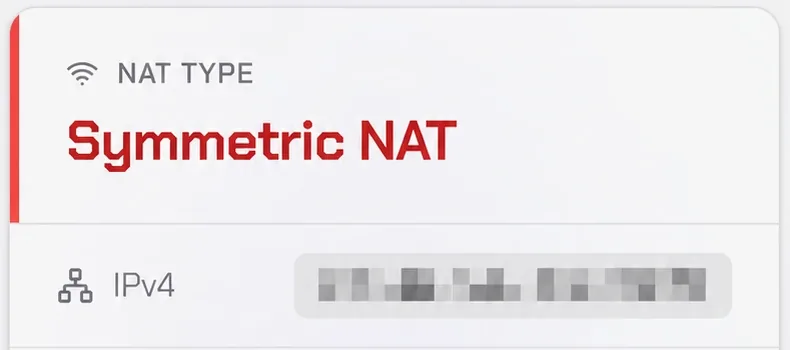
Symmetric NAT, which consoles report as Strict.
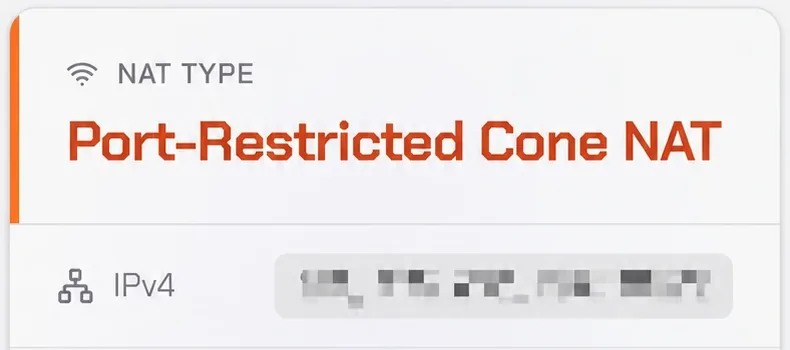
Port-Restricted Cone NAT, the Moderate tier.
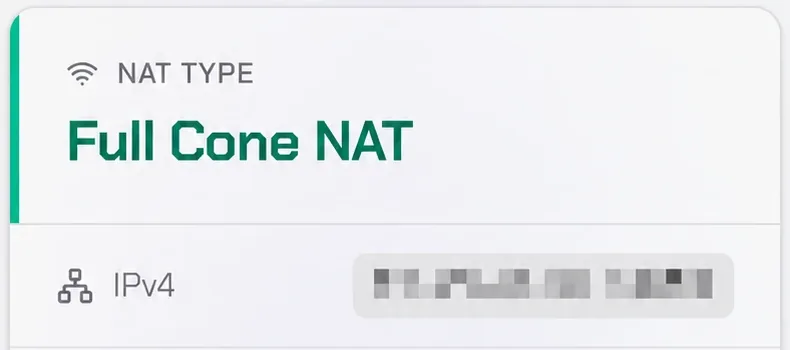
Full Cone NAT, the Open tier.
When a VPN With a NAT Feature Is the Fix
- Your ISP uses CGNAT and won’t give you a public IP
- You play on a mobile hotspot, 5G home internet or Starlink
- You are on dorm, hotel, office or shared Wi-Fi where you can’t change router settings
- You already use a VPN all the time and don’t want to turn it off to play
In these cases the NAT that blocks you sits outside your control, so router settings change nothing. The VPN replaces it with the VPN server’s NAT, and the NAT feature opens that one. See CGNAT gaming and mobile hotspot NAT type.
Best VPN to Change NAT Type: Moderate or Open
Pick by the NAT type you need. Moderate is enough for party chat, invites and most matchmaking. Open matters if you host lobbies or play peer-to-peer games with Strict players. A VPN without a NAT setting or port forwarding leaves you Strict, however fast it is.
Proton VPN
- Moderate NAT on Windows, macOS, Linux, Android and iOS
- Moderate NAT option in manual WireGuard and OpenVPN configs for routers
- Not on the free plan; paid plans only
- 30-day money-back guarantee
2-year plan
PureVPN
- Open all ports, or up to 15 chosen ports such as Xbox 3074
- Works on CGNAT, 5G, Starlink and dorm Wi-Fi
- Port forwarding is a paid add-on on top of the plan
- 31-day money-back guarantee
5-year plan·$1.69/mo $12.95/mo
This page contains affiliate links. If you sign up through them, NAT Checker may earn a commission at no extra cost to you.
Turn on Moderate NAT in Proton VPN
- Windows: Settings → Connection → Advanced settings → NAT type → Moderate, then Apply.
- macOS: Preferences → Connection → Moderate NAT.
- Android and iOS: Settings → Advanced → NAT type or Moderate NAT.
- Reconnect and run the NAT test again.
Get Open NAT with PureVPN
- Add port forwarding to your plan.
- In the Member Area, choose Enable all ports, or enter the game’s ports, and apply.
- Disconnect and reconnect the app to a server that supports port forwarding.
- Run the NAT test with the VPN on. Details: PureVPN port forwarding.
Consoles can’t run VPN apps. To change the NAT type on PS5, Xbox or Switch, run the VPN on a VPN router or share a PC’s VPN connection over Ethernet. For servers and remote access behind CGNAT rather than gaming, see the best VPN for CGNAT.
VPN NAT Type Still Strict?
Still Strict after turning the feature on
Console still says Strict
NAT improved but ping went up
The test shows a different NAT type than the game
Related Guides
Sources (checked November 1, 2026):
- • Proton VPN: Moderate NAT (Strict by default, paid plans only, app and manual config steps, not combined with port forwarding)
- • Proton VPN: Port forwarding
- • PureVPN: Port forwarding add-on (all or up to 15 ports, supported servers, 31-day refund)
- • NAT Checker test screenshots, one phone on one network, IP addresses blurred