SoftEther VPN Guide: CGNAT, Port Forwarding & Setup (2026)
Configure SoftEther VPN for remote access past CGNAT. Understand client manager setup, resolve port forwarding security risks, and compare low-latency VPN alternatives.
Quick Answer: What Is SoftEther VPN and How Does It Handle CGNAT?
SoftEther VPN is a free, open-source multi-protocol VPN system developed at the University of Tsukuba that utilizes Virtual Hubs, SSL-VPN tunnels over port 443, and built-in NAT traversal to bridge remote devices across firewalls. However, when deployed behind Carrier-Grade NAT (CGNAT) where ISPs block inbound port forwarding, SoftEther NAT-T frequently degrades to high-latency relay servers, and exposing self-hosted server ports invites automated bot scans and brute-force attacks. For stable 24/7 remote hosting without exposing your home router or debugging virtual bridges, a dedicated port-forwarding VPN (such as PureVPN or Proton VPN) is significantly more secure, fast, and effortless.
SoftEther VPN Architecture: Remote Access Past NAT & Firewalls
If you are searching for a software/service to create a VPN server on a network without port forwarding/access into router settings, or wrestling with port forwarding behind CGNAT, SoftEther VPN has historically been one of the most capable open-source tools. By combining Virtual Hubs, SSL-VPN over TCP port 443, and NAT Traversal, it lets administrators bridge remote computers directly into their home local area network.
SoftEther VPN Server Deployment Planner
Select your target use case to evaluate required listening ports, local bridging, and router exposure risks:
# SoftEther VPN Server - Remote Desktop & LAN Bridge Configuration
ListenerPort: TCP 443, TCP 5555
VirtualHub: DEFAULT
LocalBridge: Enabled (Adapter: eth0 / Realtek PCIe)
NAT-Traversal: Enabled (Host: your-lan.softether.net)
TargetService: Windows RDP (Port 3389) via Secure Virtual LAN
RouterPortForwardRequired: Port 443 TCP (Vulnerable if directly exposed to public)How Does SoftEther VPN Work? (Virtual Hub, Local Bridge & DDNS)
To understand why so many administrators look for a softether vpn download, we must inspect its underlying architecture. Developed by Daiyuu Nobori as master research at the University of Tsukuba, SoftEther ("Software Ethernet") emulates layer-2 Ethernet switches inside software. It packages Ethernet frames directly inside standard HTTPS packets (TCP port 443) using OpenSSL encryption.
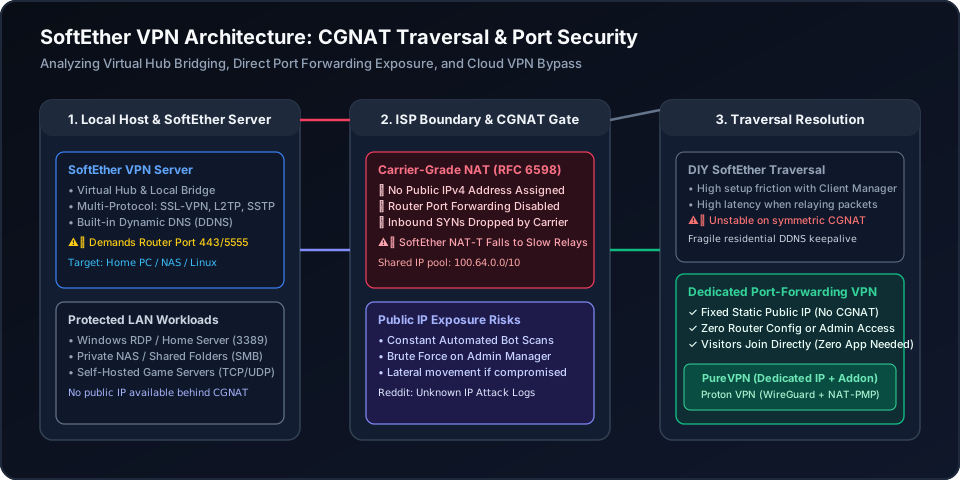
The Virtual Hub & Local Bridge
Inside the softether vpn server, a Virtual Hub operates identically to a physical Ethernet switch. By binding the Virtual Hub to your physical network interface card (NIC) via a Local Bridge, remote clients obtain local DHCP IP addresses (e.g. 192.168.1.150) directly from your home router.
This allows seamless Windows network discovery, SMB file sharing, and raw broadcast packets without complicated subnet routing tables.
SoftEther VPN Client Manager Setup
To connect from a remote PC, you must install the softether vpn client and launch the softether vpn client manager. The software installs a virtual network adapter driver directly into the Windows/Linux kernel.
While powerful, configuring the client manager requires manual entry of hostnames, port numbers, virtual hub names, and authentication modes. For non-technical users or friends joining a game, this manual process creates substantial friction.
Is SoftEther VPN Safe to Use? Port Forwarding Risks & Attack Logs
On forums like Reddit (r/AskNetsec), a recurring question from home labbers is: "Port forwarding VPN server dangerous? I noticed thousands of unknown IP probe logs within hours of opening ports."
While official softether vpn employs battle-tested AES-256 and RSA-4096 cryptography for packet encryption, exposing a self-hosted VPN server port to the open internet introduces serious operational dangers:
1. Automated Internet Port Probing
When you configure router port forwarding for ports like 443, 992, 1194, or 5555, search engines like Shodan and automated botnets detect the listening port in minutes. Your server is subjected to continuous dictionary attacks and TLS renegotiation exploits. If your administrative password or SoftEther binary has an unpatched flaw, attackers compromise the host machine.
2. Lateral Movement on the Local Bridge
Because SoftEther connects remote clients via a layer-2 Local Bridge, any device that authenticates to your Virtual Hub is placed directly on your internal home subnet. If an infected laptop or compromised credentials connect, malware can spread laterally across your private NAS, smart home devices, and personal laptops.
SoftEther vs VPN Gate: Understanding the Public Server List Risks
Many users searching for softether vpn gate or softether vpn server list download the SoftEther client with the built-in VPN Gate plugin. It is vital to recognize that VPN Gate is an academic volunteer relay network. Unlike commercial no-logs providers, anyone in the world can volunteer a node on the VPN Gate list. Volunteer node operators can inspect unencrypted DNS queries, throttle connection speeds, and log your browsing activities. For secure, private remote networking, volunteer relays should be avoided.
Port Forwarding Behind CGNAT: Why SoftEther NAT-T Frequently Fails
As IPv4 address pools exhausted, internet service providers shifted residential subscribers onto Carrier-Grade NAT (CGNAT, RFC 6598). Under CGNAT, your home router does not possess a unique public IP address; instead, thousands of homes share a dynamic block in the 100.64.0.0/10 range.
This causes two severe roadblocks when hosting a softether vpn server:
- 1Router Port Forwarding Does Not Exist:
Because your ISP router sits behind an upstream carrier gateway, creating a port forwarding rule on your local router (e.g. TP-Link, Netgear, ASUS) only forwards packets between your router and your PC. Inbound packets from the public internet are discarded at the ISP gateway before ever reaching your home.
- 2Symmetric NAT Destroys UDP Hole Punching:
SoftEther includes built-in NAT Traversal (NAT-T) that communicates with Tsukuba University STUN servers to negotiate UDP hole punching. On Full Cone or Restricted NAT, this can succeed. However, most modern 5G cellular providers (T-Mobile Home Internet, Verizon 5G) and fiber providers use Symmetric NAT, which assigns a brand-new randomized external port for every outbound packet destination. SoftEther hole punching fails 100% of the time, forcing all traffic through high-latency university relay servers (often capped at 2 Mbps with 150ms+ RTT).
SoftEther vs Modern WireGuard vs Dedicated Port-Forwarding VPN
How does a legacy self-hosted SoftEther server compare against modern WireGuard meshes and dedicated port-forwarding solutions when bypassing CGNAT?
| Feature | SoftEther VPN (Self-Hosted) | WireGuard Mesh (NetBird/Tailscale) | Commercial Port-Forwarding VPN |
|---|---|---|---|
| Bypasses CGNAT? | Fragile (Falls to slow relay) | P2P or DERP relay | 100% Guaranteed Bypass |
| Public Router Exposure? | High (Requires open router ports) | Zero (Outbound only) | Zero (Home IP hidden) |
| Visitor Software Needed? | SoftEther Client Manager | Mesh Client on every peer | Zero Apps (Direct IP/Port) |
| Speed & Latency | Medium (SSL-VPN / TCP overhead) | Fast (Kernel WireGuard) | 10 Gbps Unmetered Pipe |
| Fixed Standard Ports? | Yes (If router ports open) | No (Overlay 100.x subnet only) | Yes (Static Port Forwarding) |
| Setup Complexity | High (Bridges, TAP, DDNS) | Medium (Auth & ACLs) | 1-Click Client Connect |
The Permanent Fix: Dedicated IP & Secure Port Forwarding
Tired of debugging SoftEther Virtual Hubs, dealing with port-scanning attack logs, or being blocked by CGNAT? A commercial port-forwarding VPN provides an instant, isolated public IP with zero router risk.
PureVPN Paid Dedicated IP + Port Forwarding Add-ons
- No Router Access Needed: Completely bypasses ISP CGNAT and residential router restrictions without touching a single router setting.
- Zero Client Apps for Friends: External gamers or visitors connect directly using your dedicated static IP or domain name.
- Isolate Home Network: Attacks and port scans hit PureVPN cloud gateways instead of exposing your home router or private LAN.
- Open Specific Ports: Map standard ports (Minecraft 25565, Plex 32400, RDP 3389) via an intuitive web dashboard.
Proton VPN Plus (WireGuard + NAT-PMP)
- High-Speed WireGuard: Up to 10 Gbps unthrottled bandwidth with ultra-low packet jitter for gaming and high-volume seeding.
- Dynamic NAT-PMP Forwarding: Automatically negotiates dynamic open ports for torrent clients and peer-to-peer applications.
- Swiss Strict Privacy: Audited zero-logs architecture protected by Swiss privacy laws with full open-source client apps.
- Kill Switch & DNS Leak Guard: Prevents unencrypted traffic leaks if the VPN connection experiences packet loss.
This page contains affiliate links. If you sign up through them, NAT Checker may earn a commission at no extra cost to you.
How to Configure SoftEther VPN or Migrate to Low-Latency Port Forwarding
1. Install SoftEther VPN Server and Create a Virtual Hub
Download SoftEther VPN Server from softether-download.com. Run the installer, configure the administrative password, and create a Virtual Hub linked to a local network bridge.
2. Enable Built-in DDNS and Test NAT Traversal (NAT-T)
Enable the built-in Dynamic DNS hostname (.softether.net) and NAT Traversal service. Check whether your router can maintain persistent UDP keepalive states.
3. Install SoftEther VPN Client Manager on Connecting Devices
Download the SoftEther VPN Client and Client Manager on the remote PC. Create a Virtual Network Adapter, enter your DDNS host and port 443, and authenticate.
vpnclient start && vpncmd /CLIENT localhost /CMD AccountConnect YOUR_ACCOUNT
4. Audit Port Scanning Logs and CGNAT Relay Latency
Check server logs for unauthorized IP probes if port forwarding is opened on your router. Measure round-trip ping (RTT) to verify whether traffic is flowing direct or through university relay servers.
5. Upgrade to a Dedicated Port Forwarding VPN for 24/7 Uptime
To avoid router exposure, complex client installations, and CGNAT relay throttling, connect your host to PureVPN with a Dedicated IP or Proton VPN with NAT-PMP.
SoftEther VPN & Port Forwarding FAQ
Clear, expert answers to high-frequency technical questions regarding SoftEther setup, safety, and CGNAT bypass:
What is SoftEther VPN and how does it work?
SoftEther VPN is an open-source, multi-protocol VPN server and client software created as part of Daiyuu Nobori’s academic research at the University of Tsukuba. It emulates standard Ethernet layer-2 switches using "Virtual Hubs" and network adapters. It encapsulates all traffic over HTTPS (TCP port 443), making it capable of traversing restrictive firewalls, corporate proxies, and NAT routers without requiring specialized network hardware.
Is SoftEther free to use, and what is the difference between SoftEther and VPN Gate?
Yes, SoftEther VPN is 100% free and open-source under the Apache License 2.0. However, do not confuse official SoftEther VPN with VPN Gate. VPN Gate is an academic public relay plugin running on volunteer servers worldwide. While VPN Gate provides a free public server list for circumvention, volunteer nodes are unverified, heavily throttled, and may log or intercept unencrypted traffic. Official SoftEther VPN is intended for hosting your own private VPN server.
Is SoftEther VPN safe to use for home and gaming servers?
Official SoftEther VPN utilizes strong AES-256 and RSA-4096 cryptography with TLS encapsulation, making its encrypted tunnel highly secure. However, running a self-hosted SoftEther VPN Server on a residential connection carries operational risks: if you open server ports (443, 992, 1194, 5555) on your home router, your public IP is immediately targeted by automated vulnerability scanners and brute-force password scripts. If your server host is compromised, attackers can pivot into your home LAN.
Can SoftEther VPN bypass Carrier-Grade NAT (CGNAT) without port forwarding?
SoftEther includes a built-in NAT Traversal (NAT-T) function and free Dynamic DNS (.softether.net) intended to penetrate NAT routers. Under moderate NAT, it facilitates direct UDP hole punching. However, under aggressive Symmetric CGNAT (RFC 6598) deployed by mobile 5G home internet and modern fiber ISPs, direct hole punching fails. SoftEther is then forced to route all packets through Tsukuba University relay servers, resulting in packet loss, severe jitter, and bandwidth throttled under 2–5 Mbps.
What is the SoftEther VPN Client Manager and why is it needed?
The SoftEther VPN Client Manager is the desktop GUI application used on client devices (Windows, Linux, macOS) to create virtual network adapters, import connection settings, and connect to remote Virtual Hubs. Unlike modern WireGuard clients that configure in seconds via QR codes or config files, SoftEther Client Manager requires installing kernel-level virtual network drivers and manual adapter bridging, which can introduce OS network conflicts.
Is port forwarding a self-hosted VPN server dangerous?
Yes, forwarding ports to a residential server exposes your home network directly to the public internet. Security audits consistently show that newly exposed ports receive hundreds of automated connection probes within minutes. If the underlying OS or SoftEther service has an unpatched vulnerability, attackers can gain unauthorized entry to other household devices (PCs, NAS, smart TVs) sharing the same local subnet.
Why choose a commercial port-forwarding VPN over self-hosted SoftEther?
A commercial port-forwarding VPN (like PureVPN or Proton VPN) solves remote hosting cleanly: 1) Provides a VPN public endpoint through the host’s outgoing tunnel: PureVPN’s Dedicated IP add-on supplies a static IP, while paid Proton plans supply a dynamic forwarded port; 2) Eliminates the need to open ports on your home router, keeping your residential IP 100% invisible; 3) Requires zero client software on visiting friends devices (they connect to the VPN IP and configured forwarded port); and 4) Delivers unthrottled gigabit WireGuard throughput without relay bottlenecks.
Authoritative Standards & Diagnostic Resources
- SoftEther VPN Project Official Documentation (University of Tsukuba)
- IETF RFC 6598: IANA-Reserved IPv4 Prefix for Shared Address Space (CGNAT)
- NatChecker: The Complete Guide to Port Forwarding Behind CGNAT
- NatChecker: 7 Ways to Fix Port Forwarding Not Working on Any Router
- NatChecker: WireGuard Port Forwarding & Remote Access Guide
- NatChecker: Radmin VPN Review, Gaming Ports & CGNAT Fixes
- NatChecker: Twingate Review, Zero Trust & Plex Streaming Setup