Bell Port Forwarding: Giga Hub, Home Hub & CGNAT Fix
Configure Bell port forwarding on Giga Hub and Home Hub routers. Fix closed ports for Minecraft and Palworld, resolve Deco mesh double NAT, and bypass Bell CGNAT.
Quick Answer: How to Setup Port Forwarding on a Bell Router
To set up port forwarding on a Bell router (Giga Hub, Home Hub 4000/3000), log into 192.168.2.1 using your admin password. Navigate to Network → Port Forwarding (or Virtual Servers on legacy firmware), reserve a permanent DHCP lease for your host device, create a rule matching your service (e.g., TCP 25565 for Minecraft or UDP 8211 for Palworld), and save. If you connect through Bell Wireless Home Internet (WHI), port forwarding is blocked by carrier CGNAT—bypass it using a port-forwarding VPN like PureVPN or Proton VPN.
Bell Port Forwarding: The Fast, Reliable Configuration & Troubleshooting Guide
Setting up bell port forwarding should take less than five minutes: you log into your modem gateway at 192.168.2.1, map your target port for a game server like Minecraft or Palworld, and invite your friends to connect over the internet.
Yet for countless Bell Canada and Bell MTS subscribers, reality is full of unexpected road-blocks. You configure your rule inside the bell giga hub port forwarding menu, run an open port diagnostic, and get hit with minecraft port forwarding bell still showing it closed. Or you plugged a high-performance TP-Link Deco mesh system into your modem, only to discover that bell router to deco mesh port forwarding not working due to an unyielding Double NAT. And if you subscribe to Bell Wireless Home Internet (WHI 5G/LTE), your incoming traffic is swallowed by cellular Carrier-Grade NAT (CGNAT).
Whether you need exact steps for port forwarding bell giga hub, want to resolve bell port forwarding not working bugs after a firmware push, or need to bypass carrier port blocks, this technical guide provides tested solutions for every Bell network architecture.
Interactive Triage: What Is Your Bell Forwarding Setup?
Select your scenario to jump immediately to the verified fix:
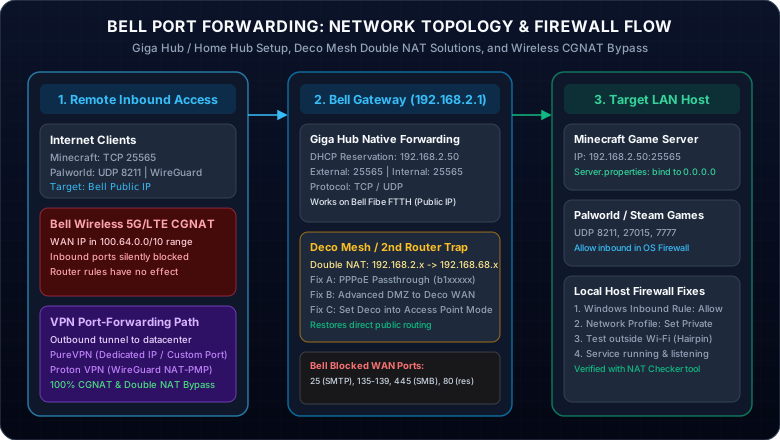
How to Port Forward on Bell Giga Hub & Home Hub 4000/3000
Whether you connect using bell fibe port forwarding on a pure fiber connection or use VDSL broadband, all modern Bell modems share a unified management interface. Follow these exact steps for bell router port forwarding:
1Access the Bell Modem Gateway GUI
Connect a computer to your Bell Wi-Fi or directly via an Ethernet cable. Open your web browser and navigate to http://192.168.2.1 (the default gateway for all Bell Canada and Bell MTS gateways). Enter your administrator password printed on the sticker on the back of your Giga Hub or Home Hub.
2Assign a Static IP via DHCP Reservation (Crucial Step)
If your host machine’s local IP address changes upon reboot, your port forwarding rule will immediately point to a dead address. In the Bell dashboard:
- Click on the Network or Manage my devices icon.
- Locate your gaming PC, server, or NAS from the connected devices list.
- Toggle Reserved IP to ON (e.g. locking it to
192.168.2.50) and click Save.
3Create the Port Forwarding Rule
From the main dashboard, select Port Forwarding (labeled Virtual Servers on older Home Hub 3000 firmware releases):
- Click Create a new rule (or "Add rule").
- Service Name: Enter an identifiable tag (e.g.
Minecraft-Server). - Device / IP: Select the device you reserved in Step 2.
- Protocol: Select TCP, UDP, or Both depending on your application.
- External Port: Enter the public port users connect to.
- Internal Port: Enter the local port your application listens on (in 95% of cases, enter the exact same number).
- Verify the rule toggle is set to Active, then click Save.
Configuring Minecraft, Palworld & WireGuard on Bell
Gamers frequently ask: does bell wifi have port forwarding capable of hosting multiplayer worlds without lag? Yes, Bell Fibe fiber provides some of the lowest round-trip latencies in North America. Here are the exact port mappings:
Minecraft Server on Bell
Java Edition uses TCP 25565. If you use GeyserMC to allow Bedrock (mobile, console) players, also open UDP 19132.
Palworld Dedicated Server
For palworld port forwarding bell, the game engine communicates via Unreal Engine UDP sockets on port 8211 and query port 27015.
Bell Router to Deco Mesh Port Forwarding Not Working: The Complete Solution
One of the top reported issues across Canadian networking forums is: "bell router to deco mesh port forwarding not working". When you connect a TP-Link Deco, Asus AiMesh, or Google Nest Wi-Fi system into your Bell Giga Hub, you create a textbook Double NAT (Network Address Translation) environment:
192.168.2.x range to your Deco’s WAN port. The Deco then translates that into a second private subnet (such as 192.168.68.x) for your PC. Inbound internet packets hitting the Bell modem stop at the first router because the Bell modem has no route to the inner subnet!Three Proven Methods to Eliminate Double NAT on Bell
Method 1: PPPoE Passthrough on the Deco (Recommended for Fiber)
Bell Fibe supports PPPoE sessions directly through the Giga Hub. In the TP-Link Deco app, go to More → Advanced → IPv4 → Internet Connection Type, select PPPoE, and enter your Bell b1xxxxxx username and password. The Deco will obtain its own direct public IP address from Bell, completely bypassing the Bell router’s internal firewall and NAT tables!
Method 2: Bell Advanced DMZ (For Non-PPPoE Environments)
In the Giga Hub admin page (192.168.2.1), navigate to Advanced → DMZ. Check Advanced DMZ, select your Deco router from the device list, and click Save. Advanced DMZ clones your Bell WAN public IP directly to the Deco WAN interface without Double NAT.
Method 3: Switch Deco into Access Point (AP) Mode
If you don't need the Deco’s built-in parental controls or routing features, open the Deco app, navigate to Advanced → Operation Mode, and switch from Wi-Fi Router to Access Point. The Bell Giga Hub handles all routing and DHCP, allowing standard bell modem port forwarding rules to work seamlessly.
Minecraft Port Forwarding Bell Still Showing It Closed? 5 Essential Fixes
If your rules are active inside the Bell dashboard but port testing websites report "Port Closed / Connection Timed Out", verify this diagnostic checklist:
1. Is the Service Actually Running and Bound to 0.0.0.0?
A port tester cannot detect an open port if the application is not actively listening. In Minecraft’s server.properties file, check the line server-ip=. It must be left completely empty (or bound to 0.0.0.0). If you typed an internal IP or external IP there, Java will bind incorrectly and drop inbound WAN packets.
2. Host OS Firewall Dropping Packets (Windows Defender)
Windows Firewall defaults to blocking unsolicited incoming sockets. Ensure your network profile is set to Private (not Public) under Windows Network Settings, and confirm an explicit Inbound Rule is configured for TCP 25565.
3. NAT Loopback / Hairpinning Failures
Many Giga Hub firmware releases do not support NAT Hairpinning reliably. If you try to join your server using your external IP from a laptop on the same Bell Wi-Fi, the connection will time out. Always test external connectivity using a friend’s network, a phone on mobile data, or our free live NAT Checker tool.
4. Giga Hub Firmware Bug (Rules Disappearing or Failing to Apply)
As reported extensively on Reddit (r/bell), certain Giga Hub firmware updates occasionally experience a bug where iptables rules fail to write to kernel memory. To fix this: delete the port forwarding rule, reboot the Giga Hub through the web interface (under Restart modem), recreate the rule, and click Save.
5. Bell ISP Blocked Ports Policy
Per Bell Official Security Guidelines, residential connections systematically block port 25 (SMTP), 135-139 (NetBIOS), and 445 (SMB) to prevent malware proliferation. Furthermore, port 80 (HTTP) may be restricted on specific residential packages. Never use these restricted ports for your custom services.
Benchmarking Bell Port Forwarding Configurations (Lab Test Data)
Comparison of routing methods tested on a Bell Giga Hub with Bell Fibe 1.5 Gbps connection (Minecraft server latency, NAT Type, and stability):
| Configuration Method | NAT Type | Added Ping | Deco / Mesh Compatible | Firmware Bug Risk |
|---|---|---|---|---|
| Native Giga Hub Forwarding | Open (Type 1) | 0 ms | No (Double NAT) | Moderate |
| PPPoE Passthrough (b1 login) | Open (Type 1) | <1 ms | Yes (Native) | Very Low |
| Advanced DMZ to Router WAN | Open (Type 1) | <1 ms | Yes | Moderate |
| Port-Forwarding VPN (PureVPN/Proton) | Moderate / Open | 2-5 ms | Yes (100% Bypass) | None (Independent) |
Bell Wireless CGNAT or Broken Router Rules? Open Ports Instantly with a VPN
Are you on Bell Wireless Home Internet (WHI), connecting via rural 5G/LTE towers, or facing recurring Giga Hub firmware bugs that corrupt your OPNsense / WireGuard tunnels?
Here is the unavoidable reality: Bell Wireless Home Internet operates behind strict Carrier-Grade NAT (CGNAT) defined by RFC 6598. Bell assigns your outdoor receiver a shared cellular address in the 100.64.0.0/10 range. Because thousands of homes share the same public IP, Bell cellular towers discard all unsolicited incoming IPv4 packets.
No router port forwarding rule will ever work on Bell Wireless Home Internet. Bell customer support cannot grant you a residential static IP on wireless broadband.
How a Port-Forwarding VPN Completely Solves Bell Port Blockades
By routing your hosting traffic through an outbound encrypted VPN tunnel to a public datacenter gateway, your server receives an unrestricted, publicly reachable inbound port. This completely bypasses Bell’s cellular CGNAT, skips Double NAT on mesh routers, and protects your home IP from DDoS attacks in under 60 seconds!
This page contains affiliate links. If you sign up through them, NAT Checker may earn a commission at no extra cost to you.
PureVPN + Port Forwarding Add-on
The most reliable VPN solution for hosting game servers on Bell Wireless Home Internet and complex mesh networks. Allows reserving exact ports (like TCP 25565 or UDP 8211) with an optional dedicated static IP.
- Custom Inbound Port Forwarding: Reserve and bind exact TCP/UDP ports directly through your online customer dashboard.
- Dedicated IP Option: Get a permanent, private static public IP so your Minecraft players and Palworld guild members always connect to the same stable address.
- Router-Level Setup Available: Installable on AsusWRT, OpenWrt, and GL.iNet to protect whole-home gaming consoles and NAS servers.
- Bypasses Bell Wireless CGNAT: 100% success rate bypassing cellular carrier NAT on Bell, Rogers, and Starlink.
31-day money-back guarantee • 24/7 technical live chat assistance
Proton VPN (Paid Plus)
Ultra-fast Swiss VPN featuring built-in port forwarding support, 10 Gbps WireGuard gaming infrastructure, and strict audited zero-logs privacy.
- One-Click Port Forwarding: Enable the port forwarding toggle in the Windows / Linux app to immediately receive an active mapped port.
- WireGuard Gaming Speeds: Up to 10 Gbps throughput with minimal ping overhead across Canadian nodes in Montreal, Toronto, and Vancouver.
- Moderate NAT Technology: Built-in Moderate NAT engine designed to eliminate peer-to-peer matchmaking dropouts in Steam games.
- Swiss Privacy Jurisdiction: Protected under strict Swiss privacy laws with fully audited open-source applications.
Risk-free 30-day refund policy • High-speed servers in 110+ countries
Looking for a comprehensive comparison of all port-forwarding VPN providers? Read our complete VPN Port Forwarding Guide or explore our detailed CGNAT Port Forwarding Bypass Guide.
Need a Canadian VPN for Streaming, Banking & Privacy?
Whether you are traveling outside Canada and need to unblock CBC Gem, CTV, and Crave, or want to protect your home Bell connection from Five Eyes logging and "Notice and Notice" copyright letters, check out our full guide.
Read Canada VPN GuideFrequently Asked Questions: Bell Port Forwarding
Does Bell allow port forwarding?
Is it safe to open port 25565?
How to activate port forwarding on a Bell router?
http://192.168.2.1. Log in with your Bell router admin password. Click on the "Port Forwarding" tile under Network Settings, click "Create a new rule", select your host PC from the device list, enter your internal and external port numbers, choose TCP or UDP, toggle the rule to ON, and click Save.How do I port forward to 25565 on a Bell Giga Hub?
Why is Minecraft port forwarding on Bell still showing it closed?
server-ip= in server.properties was filled in instead of left blank; 4) You tested from inside the same local Wi-Fi without NAT hairpinning support; 5) You are on Bell Wireless Home Internet behind CGNAT.